Subplots
This section documents a variety of features related to UltraPlot subplots, including a-b-c subplot labels, axis sharing between subplots, automatic “tight layout” spacing between subplots, and a unique feature where the figure width and/or height are automatically adjusted based on the subplot geometry.
Note
UltraPlot only supports one GridSpec per figure
(see the section on adding subplots), and UltraPlot
does not officially support the “nested” matplotlib structures
GridSpecFromSubplotSpec and SubFigure.
These restrictions have the advantage of 1) considerably simplifying the
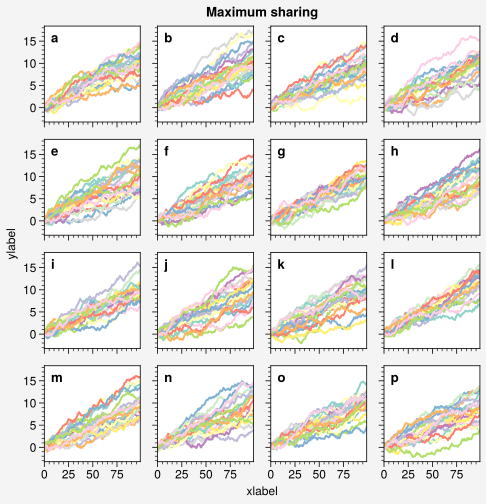
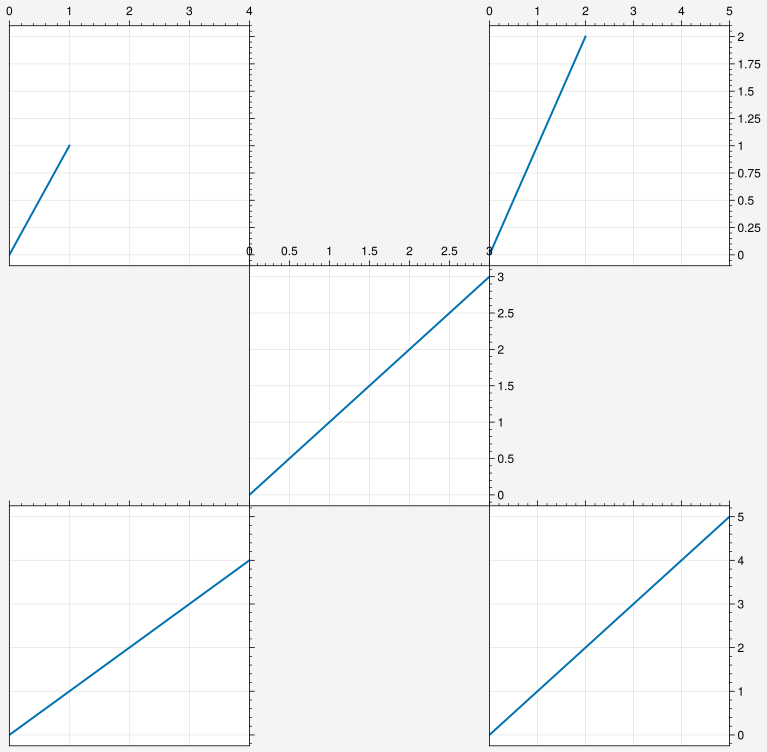
tight layout and figure size
algorithms and 2) reducing the ambiguity of a-b-c label assignment
and automatic axis sharing between subplots. If you need the
features associated with “nested” matplotlib structures, some are reproducible
with UltraPlot – including different spaces between distinct
subplot rows and columns and different formatting for
distinct groups of subplots.
A-b-c labels
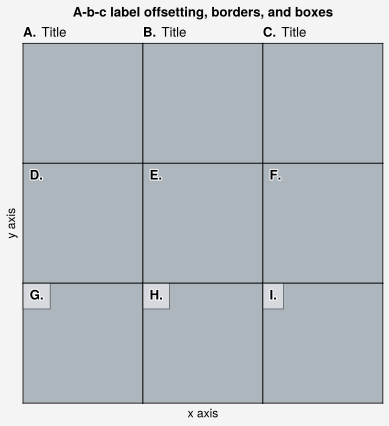
UltraPlot can quickly add labels to subplots using the abc parameter. This parameter
can be a template (with a letter “a” or “A”) used to format the subplot labels, such as “A.”, which assigns
an alphabetic label based on the axis number. Alternatively, you can pass a list to
the abc parameter, where the list elements are mapped as labels for the subplots one by one.
If you add subplots one-by-one with add_subplot(),
you can manually specify the number with the number keyword. By default, the subplot
number is incremented by 1 each time you call add_subplot().
If you draw all of your subplots at once with add_subplots(),
the numbers depend on the input arguments. If you passed an array,
the subplot numbers correspond to the numbers in the array. But if you used the ncols
and nrows keyword arguments, the number order is row-major by default and can be switched
to column-major by passing order='F' (note the number order also determines the list order
in the SubplotGrid returned by add_subplots()).
To turn on “a-b-c” labels, set rc.abc to True or pass abc=True
to format() (see the format command
for details). To change the label style, set rc.abc to e.g. 'A.' or
pass e.g. abc='A.' to format(). You can also modify
the “a-b-c” label location, weight, and size with the rc['abc.loc'],
rc['abc.weight'], and rc['abc.size'] settings. Also note that if the
an “a-b-c” label and title are in the same position, they are automatically
offset away from each other.
Note
“Inner” a-b-c labels and titles are surrounded with a white border when
rc['abc.border'] and rc['title.border'] are True (the default).
White boxes can be used instead by setting rc['abc.bbox'] and
rc['title.bbox'] to True. These options help labels stand out
against plotted content. Any text can be given “borders” or “boxes” by
passing border=True or bbox=True to ultraplot.axes.Axes.text.
[1]:
import ultraplot as uplt

fig = uplt.figure(space=0, refwidth="10em")
axs = fig.subplots(nrows=3, ncols=3)
axs.format(
    abc="A.",
    abcloc="ul",
    xticks="null",
    yticks="null",
    facecolor="gray5",
    xlabel="x axis",
    ylabel="y axis",
    suptitle="A-b-c label offsetting, borders, and boxes",
)
axs[:3].format(abcloc="l", titleloc="l", title="Title")
axs[-3:].format(abcbbox=True)  # also disables abcborder
# axs[:-3].format(abcborder=True)  # this is already the default
[2]:
import ultraplot as uplt

fig = uplt.figure(space=0, refwidth=0.7)
axs = fig.subplots(nrows=8, ncols=8)
axs.format(
    abc=True,
    abcloc="ur",
    xlabel="x axis",
    ylabel="y axis",
    xticks=[],
    yticks=[],
    suptitle="A-b-c label stress test",
)
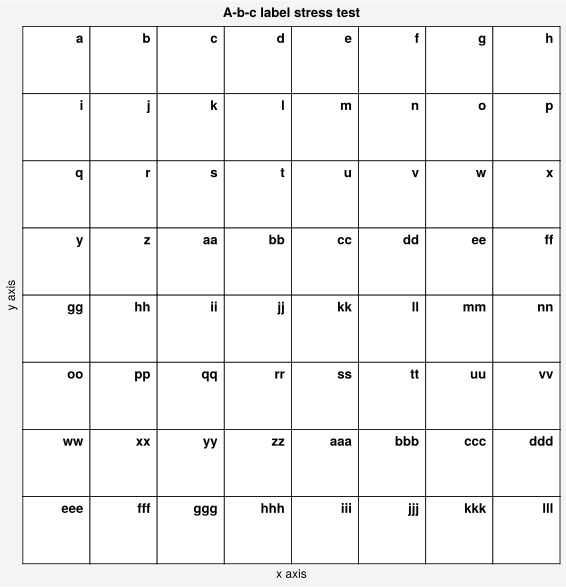
Figure width and height
UltraPlot automatically adjusts the figure width and height by default to
respect the physical size of a “reference” subplot and the geometry of the
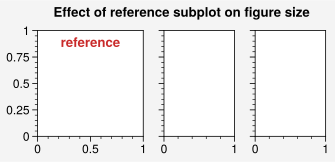
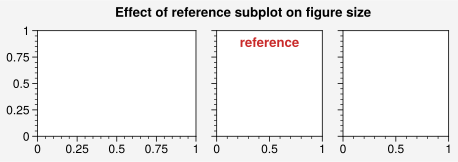
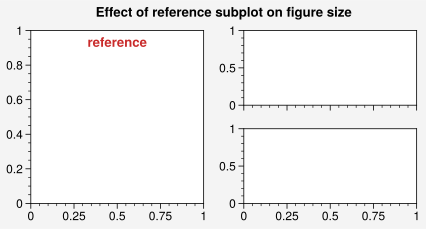
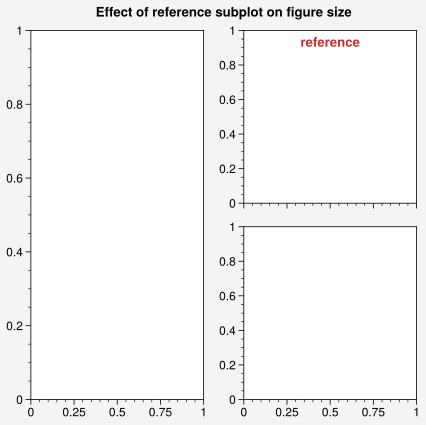
gridspec(). The “reference” subplot is the subplot whose
number() matches the refnum that was passed to
Figure (the default refnum of 1 usually matches the subplot
in the upper-left corner – see this section for more on subplot
numbers). Alternatively, you can request a fixed figure width (height), and the
algorithm will automatically adjusts the figure height (width) to respect
the gridspec() geometry.
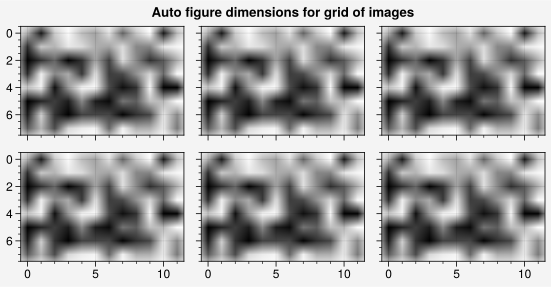
This algorithm is extremely powerful and generally produces more aesthetically
pleasing subplot grids out-of-the-box, especially when they contain images or map
projections (see below). It is constrained by the following Figure
keyword arguments:
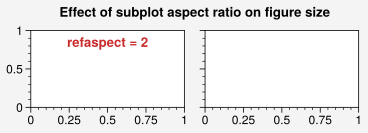
refwidth and refheight set the physical width and height of the reference subplot (default is
rc['subplots.refwidth']=2.5). If just the width (height) is specified, then the height (width) is automatically adjusted to satisfy the subplot spacing and the reference subplot aspect ratio refaspect (default is1unless the data aspect ratio is fixed – see below). If both the width and height are specified, then refaspect is ignored.figwidth and figheight set the physical width and height of the figure. As in matplotlib, you can use figsize to set both at once. If just the width (height) is specified, then the height (width) is automatically adjusted, just like with refwidth and refheight. If both the width and height are specified (e.g., using figsize), then refaspect is ignored and the figure size is fixed. Note that figwidth and figheight always override refwidth and refheight.
journal sets the physical dimensions of the figure to meet requirements for submission to an academic journal. For example,
journal='nat1'sets figwidth according to the *Nature* standard for single-column figures andjournal='aaas2'sets figwidth according to the *Science* standard for dual-column figures. See this table for the currently available journal specifications (feel free to add to this list with a pull request).
The below examples demonstrate how different keyword arguments and subplot arrangements influence the figure size algorithm.
Important
If the data aspect ratio of the reference subplot is fixed (either due to calling
set_aspect()or filling the subplot with a geographic projection,imshow()plot, orheatmap()plot), then this is used as the default value for the reference aspect ratio refaspect. This helps minimize excess space between grids of subplots with fixed aspect ratios.For the simplest subplot grids (e.g., those created by passing integers to
add_subplot()or passing ncols or nrows toadd_subplots()) the keyword arguments refaspect, refwidth, and refheight effectively apply to every subplot in the figure – not just the reference subplot.The physical widths of UltraPlot
colorbar()s andpanel()s are always independent of the figure size.GridSpecspecifies their widths in physical units to help users avoid drawing colorbars and panels that look “too skinny” or “too fat” depending on the number of subplots in the figure.
[3]:
import ultraplot as uplt
import numpy as np

# Grid of images (note the square pixels)
state = np.random.RandomState(51423)
colors = np.tile(state.rand(8, 12, 1), (1, 1, 3))
fig, axs = uplt.subplots(ncols=3, nrows=2, refwidth=1.7)
fig.format(suptitle="Auto figure dimensions for grid of images")
for ax in axs:
    ax.imshow(colors)

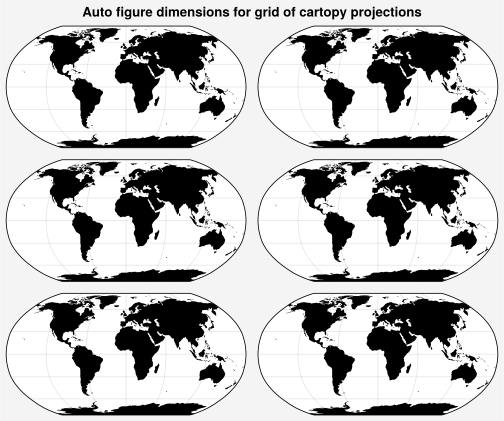
# Grid of cartopy projections
fig, axs = uplt.subplots(ncols=2, nrows=3, proj="robin", share=0)
axs.format(land=True, landcolor="k")
fig.format(suptitle="Auto figure dimensions for grid of cartopy projections")
[4]:
import ultraplot as uplt

uplt.rc.update(grid=False, titleloc="uc", titleweight="bold", titlecolor="red9")

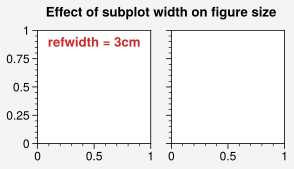
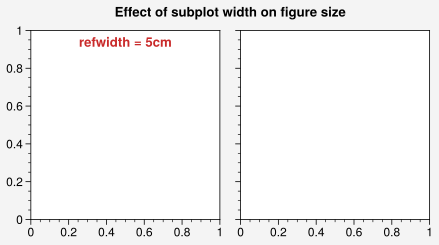
# Change the reference subplot width
suptitle = "Effect of subplot width on figure size"
for refwidth in ("3cm", "5cm"):
    fig, axs = uplt.subplots(
        ncols=2,
        refwidth=refwidth,
    )
    axs[0].format(title=f"refwidth = {refwidth}", suptitle=suptitle)

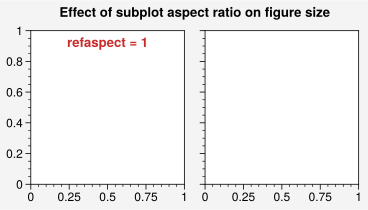
# Change the reference subplot aspect ratio
suptitle = "Effect of subplot aspect ratio on figure size"
for refaspect in (1, 2):
    fig, axs = uplt.subplots(ncols=2, refwidth=1.6, refaspect=refaspect)
    axs[0].format(title=f"refaspect = {refaspect}", suptitle=suptitle)

# Change the reference subplot
suptitle = "Effect of reference subplot on figure size"
for ref in (1, 2):  # with different width ratios
    fig, axs = uplt.subplots(ncols=3, wratios=(3, 2, 2), ref=ref, refwidth=1.1)
    axs[ref - 1].format(title="reference", suptitle=suptitle)
for ref in (1, 2):  # with complex subplot grid
    fig, axs = uplt.subplots([[1, 2], [1, 3]], refnum=ref, refwidth=1.8)
    axs[ref - 1].format(title="reference", suptitle=suptitle)

uplt.rc.reset()
Spacing and tight layout
UltraPlot automatically adjusts the spacing between subplots
by default to accomadate labels using its own “tight layout” algorithm.
In contrast to matplotlib’s algorithm, UltraPlot’s algorithm can change the
figure size and permits variable spacing between each subplot
row and column (see ultraplot.gridspec.GridSpec for details).
This algorithm can be disabled entirely by passing tight=False to
Figure or by setting rc['subplots.tight'] to False, or
it can be partly overridden by passing any of the spacing arguments left, right,
top, bottom, wspace, or hspace to Figure or
GridSpec. For example:
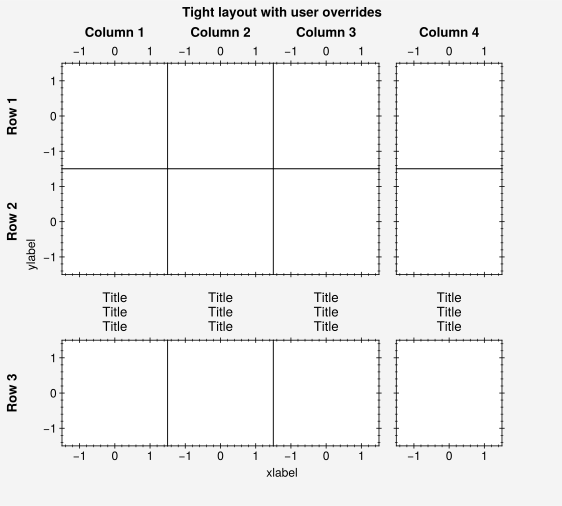
left=2fixes the left margin at 2 em-widths, while the right, bottom, and top margin widths are determined by the tight layout algorithm.wspace=1fixes the space between subplot columns at 1 em-width, while the space between subplot rows is determined by the tight layout algorithm.wspace=(3, None)fixes the space between the first two columns of a three-column plot at 3 em-widths, while the space between the second two columns is determined by the tight layout algorithm.
The padding between the tight layout extents (rather than the absolute spaces
between subplot edges) can also be changed by passing outerpad, innerpad,
or panelpad to Figure or GridSpec.
This padding can be set locally by passing an array of values to wpad
and hpad (analogous to wspace and hspace), or by passing the pad
keyword when creating panel axes or outer
colorbars or legends (analogous to space).
All the subplot spacing arguments can be specified with a
unit string interpreted by units().
The default unit assumed for numeric arguments is an “em-width” (i.e., a
rc['font.size'] width – see the units table for details).
Note
The core behavior of the tight layout algorithm can be modified with a few
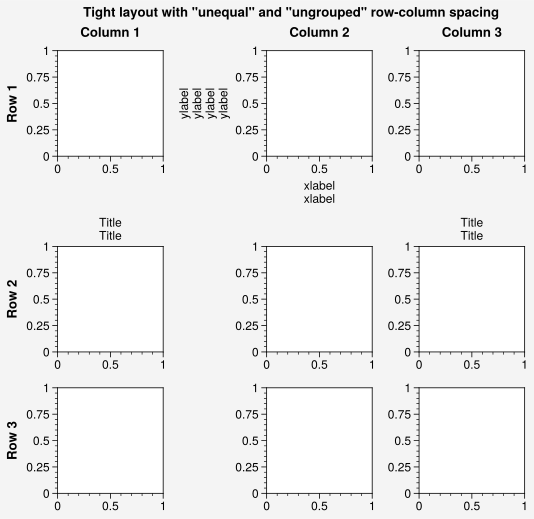
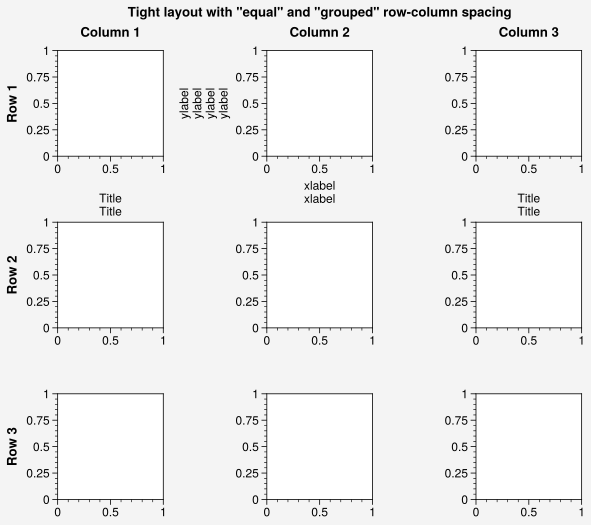
keyword arguments and settings. Using wequal=True, hequal=True, or
equal=True (or setting rc['subplots.equalspace'] to True) constrains
the tight layout algorithm to produce equal spacing between main subplot columns
or rows (note that equal spacing is the default behavior when tight layout is
disabled). Similarly, using wgroup=False, hgroup=False, or group=False
(or setting rc['subplots.groupspace'] to False) disables the default
behavior of only comparing subplot extent between adjacent subplot “groups”
and instead compares subplot extents across entire columns and rows
(note the spacing between the first and second row in the below example).
[5]:
import ultraplot as uplt

# Stress test of the tight layout algorithm
# This time override the algorithm between selected subplot rows/columns
fig, axs = uplt.subplots(
    ncols=4,
    nrows=3,
    refwidth=1.1,
    span=False,
    bottom="5em",
    right="5em",  # margin spacing overrides
    wspace=(0, 0, None),
    hspace=(0, None),  # column and row spacing overrides
)
axs.format(
    grid=False,
    xlocator=1,
    ylocator=1,
    tickdir="inout",
    xlim=(-1.5, 1.5),
    ylim=(-1.5, 1.5),
    suptitle="Tight layout with user overrides",
    toplabels=("Column 1", "Column 2", "Column 3", "Column 4"),
    leftlabels=("Row 1", "Row 2", "Row 3"),
)
axs[0, :].format(xtickloc="top")
axs[2, :].format(xtickloc="both")
axs[:, 1].format(ytickloc="neither")
axs[:, 2].format(ytickloc="right")
axs[:, 3].format(ytickloc="both")
axs[-1, :].format(xlabel="xlabel", title="Title\nTitle\nTitle")
axs[:, 0].format(ylabel="ylabel")
[6]:
import ultraplot as uplt

# Stress test of the tight layout algorithm
# Add large labels along the edge of one subplot
equals = [("unequal", False), ("unequal", False), ("equal", True)]
groups = [("grouped", True), ("ungrouped", False), ("grouped", True)]
for (name1, equal), (name2, group) in zip(equals, groups):
    suffix = " (default)" if group and not equal else ""
    suptitle = f'Tight layout with "{name1}" and "{name2}" row-column spacing{suffix}'
    fig, axs = uplt.subplots(
        nrows=3,
        ncols=3,
        refwidth=1.1,
        share=False,
        equal=equal,
        group=group,
    )
    axs[1].format(xlabel="xlabel\nxlabel", ylabel="ylabel\nylabel\nylabel\nylabel")
    axs[3:6:2].format(
        title="Title\nTitle",
        titlesize="med",
    )
    axs.format(
        grid=False,
        toplabels=("Column 1", "Column 2", "Column 3"),
        leftlabels=("Row 1", "Row 2", "Row 3"),
        suptitle=suptitle,
    )

Axis label sharing
Figures with lots of subplots often have redundant labels. To help address this, the matplotlib command matplotlib.pyplot.subplots includes sharex and sharey keywords that permit sharing axis limits and ticks between like rows and columns of subplots. UltraPlot builds on this feature by:
Automatically sharing axes between subplots and panels occupying the same rows or columns of the
GridSpec. This works for aribtrarily complex subplot grids. It also works for subplots generated one-by-one withadd_subplot()rather thansubplots(). It is controlled by the sharex and shareyFigurekeywords (default isrc['subplots.share']=True). Use the share keyword as a shorthand to set both sharex and sharey.Automatically sharing labels across subplots and panels with edges along the same row or column of the
GridSpec. This also works for complex subplot grids and subplots generated one-by-one. It is controlled by the spanx and spanyFigurekeywords (default isrc['subplots.span']=True). Use the span keyword as a shorthand to set both spanx and spany. Note that unlike ~matplotlib.figure.Figure.supxlabel and ~matplotlib.figure.Figure.supylabel, these labels are aligned between gridspec edges rather than figure edges.Supporting five sharing “levels”. These values can be passed to sharex, sharey, or share, or assigned to
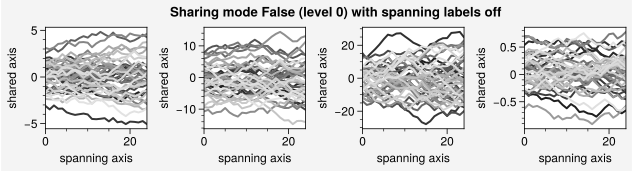
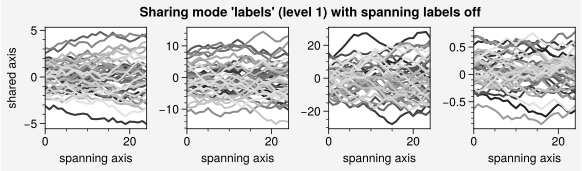
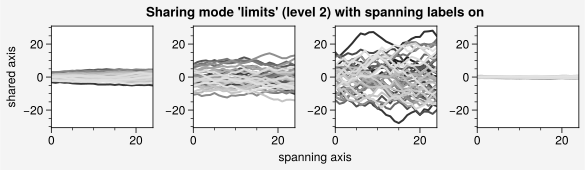
rc['subplots.share']. The levels are defined as follows:Falseor0: Axis sharing is disabled.'labels','labs', or1: Axis labels are shared, but nothing else. Labels will appear on the outermost plots. This implies that for left and bottom labels (default), the labels will appear on the leftmost and bottommost subplots. Note that labels will be shared only for plots that are immediately adjacent in the same row or column of theGridSpec; a space or empty plot will add the labels, but not break the limit sharing. See below for a more complex example.
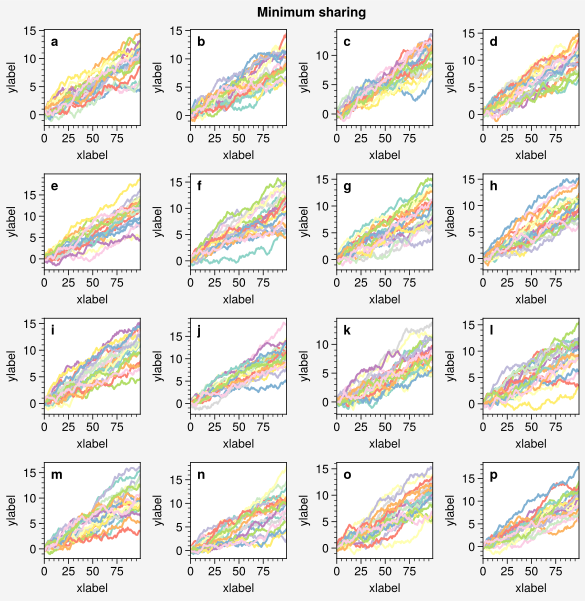
The below examples demonstrate the effect of various axis and label sharing settings on the appearance of several subplot grids.
[7]:
import ultraplot as uplt
import numpy as np

N = 50
M = 40
state = np.random.RandomState(51423)
cycle = uplt.Cycle("grays_r", M, left=0.1, right=0.8)
datas = []
for scale in (1, 3, 7, 0.2):
    data = scale * (state.rand(N, M) - 0.5).cumsum(axis=0)[N // 2 :, :]
    datas.append(data)

# Plots with different sharing and spanning settings
# Note that span=True and share=True are the defaults
spans = (False, False, True, True)
shares = (False, "labels", "limits", True)
for i, (span, share) in enumerate(zip(spans, shares)):
    fig = uplt.figure(refaspect=1, refwidth=1.06, spanx=span, sharey=share)
    axs = fig.subplots(ncols=4)
    for ax, data in zip(axs, datas):
        on = ("off", "on")[int(span)]
        ax.plot(data, cycle=cycle)
        ax.format(
            grid=False,
            xlabel="spanning axis",
            ylabel="shared axis",
            suptitle=f"Sharing mode {share!r} (level {i}) with spanning labels {on}",
        )

[8]:
import ultraplot as uplt
import numpy as np

state = np.random.RandomState(51423)

# Plots with minimum and maximum sharing settings
# Note that all x and y axis limits and ticks are identical
spans = (False, True)
shares = (False, "all")
titles = ("Minimum sharing", "Maximum sharing")
for span, share, title in zip(spans, shares, titles):
    fig = uplt.figure(refwidth=1, span=span, share=share)
    axs = fig.subplots(nrows=4, ncols=4)
    for ax in axs:
        data = (state.rand(100, 20) - 0.4).cumsum(axis=0)
        ax.plot(data, cycle="Set3")
    axs.format(
        abc=True,
        abcloc="ul",
        suptitle=title,
        xlabel="xlabel",
        ylabel="ylabel",
        grid=False,
        xticks=25,
        yticks=5,
    )
When subplots are arranged on a grid, UltraPlot will automatically share axis labels where appropriate. For more complex layouts, UltraPlot will add the labels when the subplot is facing and “edge” which is defined as not immediately having a subplot next to it. For example:
[9]:
import ultraplot as uplt, numpy as np

layout = [[1, 0, 2], [0, 3, 0], [4, 0, 6]]
fig, ax = uplt.subplots(layout)
ax.format(xtickloc="top", ytickloc="right")
# plot data to indicate that limits are still shared
x = y = np.linspace(0, 1, 10)
for axi in ax:
    axi.plot(axi.number * x, axi.number * y)
Notice how the top and right labels here are added since no subplot is immediately adjacent to another, the limits however, are shared.
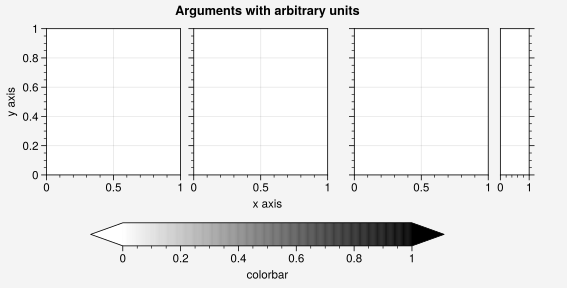
Physical units
UltraPlot supports arbitrary physical units for controlling the figure
figwidth and figheight; the reference subplot refwidth and refheight;
the gridspec spacing and tight layout padding keywords left, right, bottom,
top, wspace, hspace, outerpad, innerpad, panelpad, wpad, and hpad;
the colorbar() and panel() widths;
various legend() spacing and padding arguments; various
format() font size and padding arguments; the line width and
marker size arguments passed to PlotAxes commands; and all
applicable rc() settings, e.g. rc['subplots.refwidth'],
rc['legend.columnspacing'], and rc['axes.labelpad']. This feature is
powered by the physical units engine units().
When one of these keyword arguments is numeric, a default physical unit is used. For subplot and figure sizes, the defult unit is inches. For gridspec and legend spaces, the default unit is em-widths. For font sizes, text padding, and line widths, the default unit is points. See the relevant documentation in the API reference for details. A table of acceptable physical units is found here – they include centimeters, millimeters, pixels, em-widths, en-heights, and points.
[10]:
import ultraplot as uplt
import numpy as np

with uplt.rc.context(fontsize="12px"):  # depends on rc['figure.dpi']
    fig, axs = uplt.subplots(
        ncols=3,
        figwidth="15cm",
        figheight="3in",
        wspace=("10pt", "20pt"),
        right="10mm",
    )
    cb = fig.colorbar(
        "Mono",
        loc="b",
        extend="both",
        label="colorbar",
        width="2em",
        extendsize="3em",
        shrink=0.8,
    )
    pax = axs[2].panel_axes("r", width="5en")
axs.format(
    suptitle="Arguments with arbitrary units",
    xlabel="x axis",
    ylabel="y axis",
)