Color names
UltraPlot registers several new color names and includes tools for defining your own color names. These features are described below.
Included colors
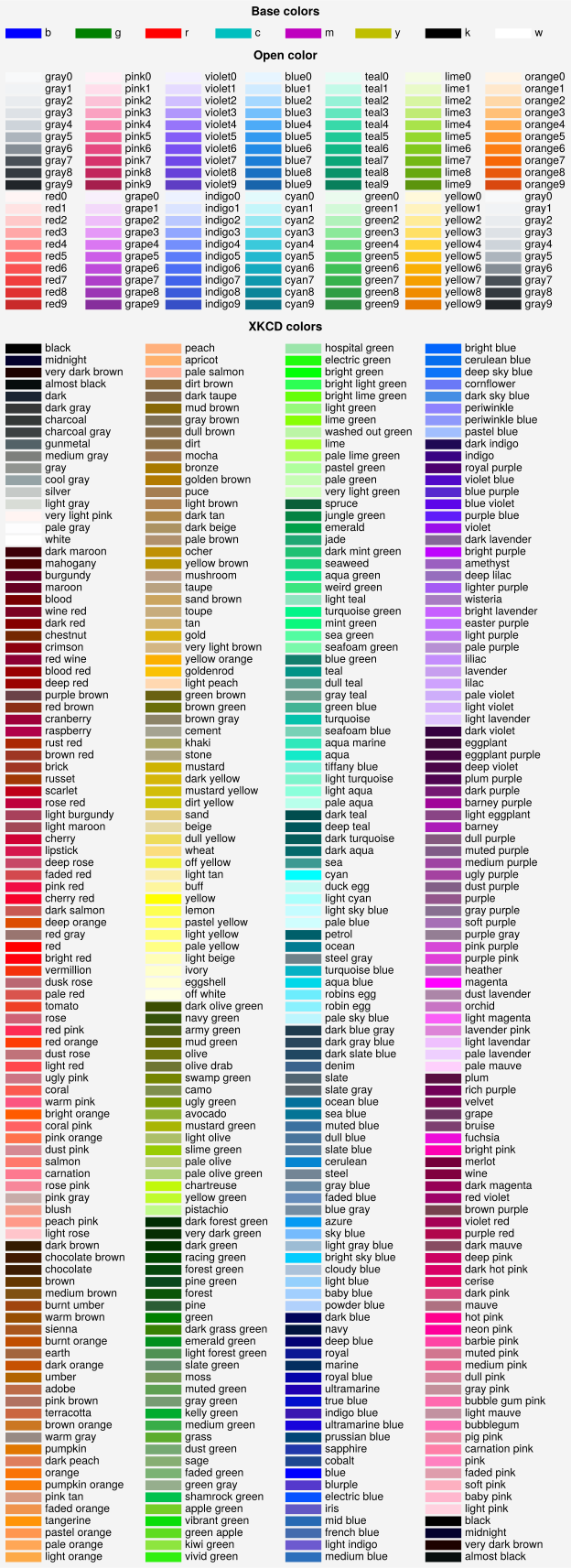
UltraPlot adds new color names from the XKCD color survey and
the Open Color UI design color
palettes. You can use show_colors() to generate a table of these
colors. Note that matplotlib’s native X11/CSS4 named colors are still
registered, but some of these color names may be overwritten by the XKCD names,
and we encourage choosing colors from the below tables instead. XKCD colors
are available in matplotlib under the
xkcd: prefix, but UltraPlot doesn’t require this prefix because the XKCD
selection is larger and the names are generally more likely to match your
intuition for what a color “should” look like.
For all colors, UltraPlot ensures that 'grey' is a synonym of 'gray'
(for example, 'grey5' and 'gray5' are both valid). UltraPlot also
retricts the available XKCD colors with a filtering algorithm so they are
“distinct” in perceptually uniform space. This
makes it a bit easier to pick out colors from the table generated with
show_colors(). The filtering algorithm also cleans up similar
names – for example, 'reddish' and 'reddy' are changed to 'red'.
You can adjust the filtering algorithm by calling register_colors()
with the space or margin keywords.
[1]:
import ultraplot as uplt

fig, axs = uplt.show_colors()
Modifying colors
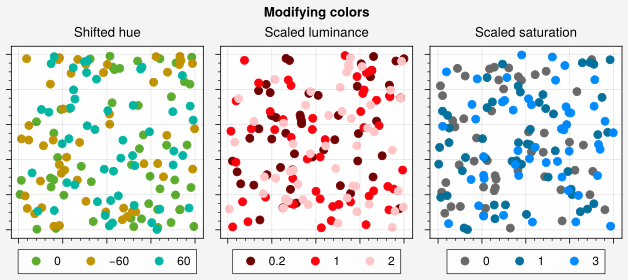
UltraPlot provides the top-level set_alpha(),
set_hue(), set_saturation(),
set_luminance(), shift_hue(),
scale_saturation(), and scale_luminance()
functions for quickly modifying existing colors. The set functions change
individual hue, saturation, or luminance values in the perceptually uniform
colorspace specified by the space keyword (default is 'hcl').
The shift and scale functions shift or scale the
hue, saturation, or luminance by the input value – for example,
uplt.scale_luminance('color', 1.2) makes 'color' 20% brighter. These
are useful for creating color gradations outside of Cycle
or if you simply spot a color you like and want to make it a bit
brighter, less vibrant, etc.
[2]:
import ultraplot as uplt
import numpy as np

# Figure
state = np.random.RandomState(51423)
fig, axs = uplt.subplots(ncols=3, axwidth=2)
axs.format(
    suptitle="Modifying colors",
    toplabels=("Shifted hue", "Scaled luminance", "Scaled saturation"),
    toplabelweight="normal",
    xformatter="none",
    yformatter="none",
)

# Shifted hue
N = 50
fmt = uplt.SimpleFormatter()
marker = "o"
for shift in (0, -60, 60):
    x, y = state.rand(2, N)
    color = uplt.shift_hue("grass", shift)
    axs[0].scatter(x, y, marker=marker, c=color, legend="b", label=fmt(shift))

# Scaled luminance
for scale in (0.2, 1, 2):
    x, y = state.rand(2, N)
    color = uplt.scale_luminance("bright red", scale)
    axs[1].scatter(x, y, marker=marker, c=color, legend="b", label=fmt(scale))

# Scaled saturation
for scale in (0, 1, 3):
    x, y = state.rand(2, N)
    color = uplt.scale_saturation("ocean blue", scale)
    axs[2].scatter(x, y, marker=marker, c=color, legend="b", label=fmt(scale))
Colors from colormaps
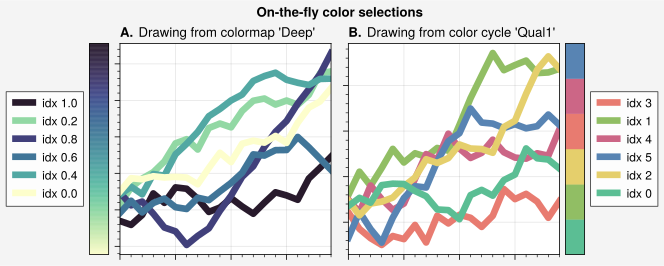
If you want to draw an individual color from a colormap or a color cycle,
use key=(cmap, coord) or key=(cycle, index) with any keyword key
that accepts color specifications (e.g., color, edgecolor, or facecolor).
The coord should be a float between 0 and 1, denoting the coordinate
within a smooth colormap, while the index should be the integer index
on the discrete colormap color list. This feature is powered by the
~ultraplot.colors.ColorDatabase class. This is useful if you spot a
nice color in one of the available colormaps or color cycles and want
to use it for some arbitrary plot element. Use the to_rgb() or
to_rgba() functions to retrieve the RGB or RGBA channel values.
[3]:
import ultraplot as uplt
import numpy as np

# Initial figure and random state
state = np.random.RandomState(51423)
fig = uplt.figure(refwidth=2.2, share=False)

# Drawing from colormaps
name = "Deep"
idxs = uplt.arange(0, 1, 0.2)
state.shuffle(idxs)
ax = fig.subplot(121, grid=True, title=f"Drawing from colormap {name!r}")
for idx in idxs:
    data = (state.rand(20) - 0.4).cumsum()
    h = ax.plot(
        data,
        lw=5,
        color=(name, idx),
        label=f"idx {idx:.1f}",
        legend="l",
        legend_kw={"ncols": 1},
    )
ax.colorbar(uplt.Colormap(name), loc="l", locator="none")

# Drawing from color cycles
name = "Qual1"
idxs = np.arange(6)
state.shuffle(idxs)
ax = fig.subplot(122, title=f"Drawing from color cycle {name!r}")
for idx in idxs:
    data = (state.rand(20) - 0.4).cumsum()
    h = ax.plot(
        data,
        lw=5,
        color=(name, idx),
        label=f"idx {idx:.0f}",
        legend="r",
        legend_kw={"ncols": 1},
    )
ax.colorbar(uplt.Colormap(name), loc="r", locator="none")
fig.format(
    abc="A.",
    titleloc="l",
    suptitle="On-the-fly color selections",
    xformatter="null",
    yformatter="null",
)
Using your own colors
You can register your own colors by adding .txt files to the
colors subfolder inside user_folder(),
or to a folder named ultraplot_colors in the same directory as your python session
or an arbitrary parent directory (see local_folders()).
After adding the file, call register_colors() or restart your python
session. You can also manually pass file paths, dictionaries, name=color
keyword arguments to register_colors(). Each color
file should contain lines that look like color: #xxyyzz
where color is the registered color name and #xxyyzz is
the HEX value. Lines beginning with # are ignored as comments.