Colorbars and legends
UltraPlot includes some useful changes to the matplotlib API that make working with colorbars and legends easier. Notable features include “inset” colorbars, “outer” legends, on-the-fly colorbars and legends, colorbars built from artists, and row-major and centered-row legends.
Outer and inset locations
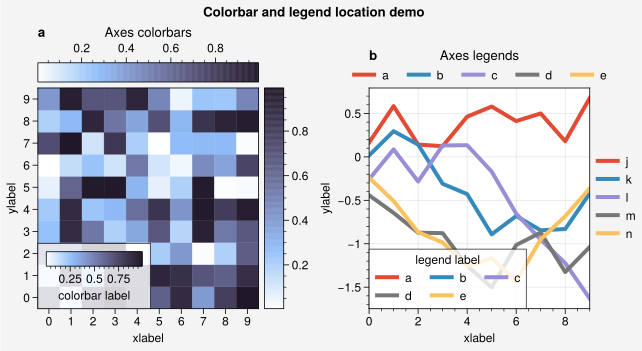
Matplotlib supports drawing “inset” legends and “outer” colorbars using the loc and location keyword arguments. However, “outer” legends are only posssible using the somewhat opaque bbox_to_anchor keyword (see here) and “inset” colorbars are not possible without manually creating and positioning the associated axes. UltraPlot tries to improve this behavior:
legend()can draw both “inset” legends when you request an inset location (e.g.,loc='upper right'or the shorthandloc='ur') and “outer” legends along a subplot edge when you request a side location (e.g.,loc='right'or the shorthandloc='r'). If you draw multiple legends or colorbars on one side, they are “stacked” on top of each other. Unlike using bbox_to_anchor, the “outer” legend position is adjusted automatically when the tight layout algorithm is active.UltraPlot adds the axes command ultraplot.axes.Axes.colorbar, analogous to
legend()and equivalent to callingcolorbar()with an ax keyword.colorbar()can draw both “outer” colorbars when you request a side location (e.g.,loc='right'or the shorthandloc='r') and “inset” colorbars when you request an inset location (e.g.,loc='upper right'or the shorthandloc='ur'). Inset colorbars have optional background “frames” that can be configured with variouscolorbar()keywords.
colorbar() and legend() also both accept
space and pad keywords. space controls the absolute separation of the
“outer” colorbar or legend from the parent subplot edge and pad controls the
tight layout padding relative to the subplot’s tick and axis labels
(or, for “inset” locations, the padding between the subplot edge and the inset frame).
The below example shows a variety of arrangements of “outer” and “inset”
colorbars and legends.
Important
Unlike matplotlib, UltraPlot adds “outer” colorbars and legends by allocating
new rows and columns in the GridSpec rather than
“stealing” space from the parent subplot (note that subsequently indexing
the GridSpec will ignore the slots allocated for
colorbars and legends). This approach means that “outer” colorbars and
legends do not affect subplot aspect ratios
and do not affect subplot spacing, which lets
UltraPlot avoid relying on complicated “constrained layout” algorithms
and tends to improve the appearance of figures with even the most
complex arrangements of subplots, colorbars, and legends.
[1]:
import numpy as np

import ultraplot as uplt

state = np.random.RandomState(51423)
fig = uplt.figure(share=False, refwidth=2.3)

# Colorbars
ax = fig.subplot(121, title="Axes colorbars")
data = state.rand(10, 10)
m = ax.heatmap(data, cmap="dusk")
ax.colorbar(m, loc="r")
ax.colorbar(m, loc="t")  # title is automatically adjusted
ax.colorbar(m, loc="ll", label="colorbar label")  # inset colorbar demonstration

# Legends
ax = fig.subplot(122, title="Axes legends", titlepad="0em")
data = (state.rand(10, 5) - 0.5).cumsum(axis=0)
hs = ax.plot(data, lw=3, cycle="ggplot", labels=list("abcde"))
ax.legend(loc="ll", label="legend label")  # automatically infer handles and labels
ax.legend(hs, loc="t", ncols=5, frame=False)  # automatically infer labels from handles
ax.legend(hs, list("jklmn"), loc="r", ncols=1, frame=False)  # manually override labels
fig.format(
    abc=True,
    xlabel="xlabel",
    ylabel="ylabel",
    suptitle="Colorbar and legend location demo",
)
On-the-fly colorbars and legends
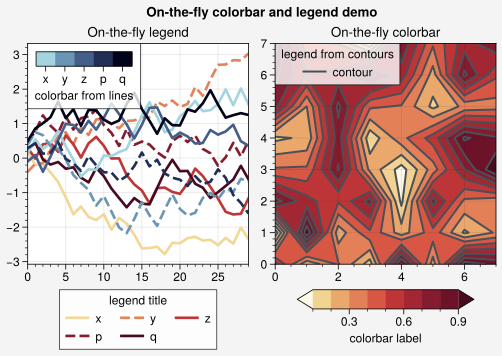
In UltraPlot, you can add colorbars and legends on-the-fly by supplying keyword
arguments to various PlotAxes commands. To plot data and
draw a colorbar or legend in one go, pass a location (e.g., colorbar='r'
or legend='b') to the plotting command (e.g., plot()
or contour()). To pass keyword arguments to the colorbar
and legend commands, use the legend_kw and colorbar_kw arguments (e.g.,
legend_kw={'ncol': 3}). Note that colorbar() can also
build colorbars from lists of arbitrary matplotlib artists, for example the
lines generated by plot() or line()
(see below).
Note
Specifying the same colorbar location with multiple plotting calls will have a different effect depending on the plotting command. For 1D commands, this will add each item to a “queue” used to build colorbars from a list of artists. For 2D commands, this will “stack” colorbars in outer locations, or replace existing colorbars in inset locations. By contrast, specifying the same legend location will always add items to the same legend rather than creating “stacks”.
[2]:
import ultraplot as uplt

labels = list("xyzpq")
state = np.random.RandomState(51423)
fig = uplt.figure(share=0, refwidth=2.3, suptitle="On-the-fly colorbar and legend demo")

# Legends
data = (state.rand(30, 10) - 0.5).cumsum(axis=0)
ax = fig.subplot(121, title="On-the-fly legend")
ax.plot(  # add all at once
    data[:, :5],
    lw=2,
    cycle="Reds1",
    cycle_kw={"ls": ("-", "--"), "left": 0.1},
    labels=labels,
    legend="b",
    legend_kw={"title": "legend title"},
)
for i in range(5):
    ax.plot(  # add one-by-one
        data[:, 5 + i],
        label=labels[i],
        linewidth=2,
        cycle="Blues1",
        cycle_kw={"N": 5, "ls": ("-", "--"), "left": 0.1},
        colorbar="ul",
        colorbar_kw={"label": "colorbar from lines"},
    )

# Colorbars
ax = fig.subplot(122, title="On-the-fly colorbar")
data = state.rand(8, 8)
ax.contourf(
    data,
    cmap="Reds1",
    extend="both",
    colorbar="b",
    colorbar_kw={"length": 0.8, "label": "colorbar label"},
)
ax.contour(
    data,
    color="gray7",
    lw=1.5,
    label="contour",
    legend="ul",
    legend_kw={"label": "legend from contours"},
)
[2]:
<matplotlib.contour.QuadContourSet at 0x7733304296d0>
[3]:
import numpy as np

import ultraplot as uplt

N = 10
state = np.random.RandomState(51423)
fig, axs = uplt.subplots(
    nrows=2,
    share=False,
    refwidth="55mm",
    panelpad="1em",
    suptitle="Stacked colorbars demo",
)

# Repeat for both axes
args1 = (0, 0.5, 1, 1, "grays", 0.5)
args2 = (0, 0, 0.5, 0.5, "reds", 1)
args3 = (0.5, 0, 1, 0.5, "blues", 2)
for j, ax in enumerate(axs):
    ax.format(xlabel="data", xlocator=np.linspace(0, 0.8, 5), title=f"Subplot #{j+1}")
    for i, (x0, y0, x1, y1, cmap, scale) in enumerate((args1, args2, args3)):
        if j == 1 and i == 0:
            continue
        data = state.rand(N, N) * scale
        x, y = np.linspace(x0, x1, N + 1), np.linspace(y0, y1, N + 1)
        m = ax.pcolormesh(x, y, data, cmap=cmap, levels=np.linspace(0, scale, 11))
        ax.colorbar(m, loc="l", label=f"dataset #{i + 1}")
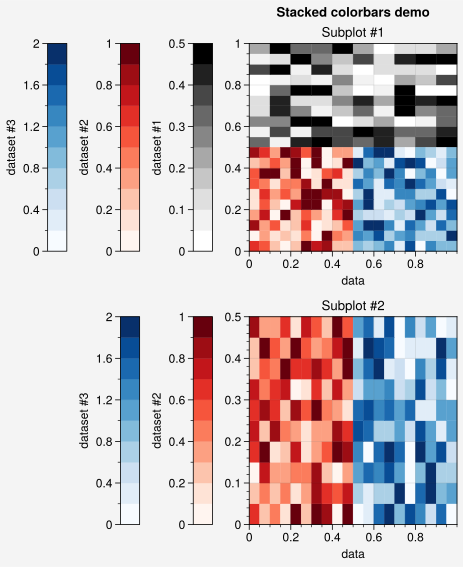
Figure-wide colorbars and legends
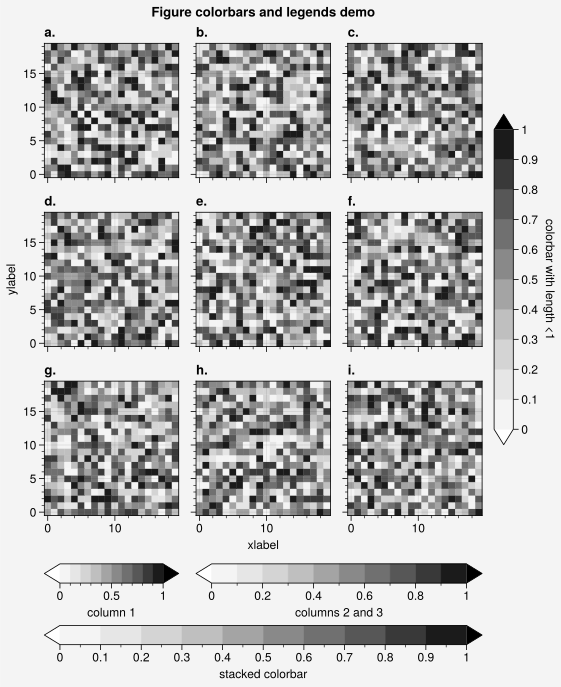
In UltraPlot, colorbars and legends can be added to the edge of figures using the
figure methods ultraplot.figure.Figure.colorbar and ultraplot.figure.Figure.legend.
These methods align colorbars and legends between the edges
of the gridspec() rather than the figure.
As with axes colorbars and legends, if you
draw multiple colorbars or legends on the same side, they are stacked on
top of each other. To draw a colorbar or legend alongside particular row(s) or
column(s) of the subplot grid, use the row, rows, col, or cols keyword
arguments. You can pass an integer to draw the colorbar or legend beside a
single row or column (e.g., fig.colorbar(m, row=1)), or pass a tuple to
draw the colorbar or legend along a range of rows or columns
(e.g., fig.colorbar(m, rows=(1, 2))). The space separation between the subplot
grid edge and the colorbars or legends can be controlled with the space keyword,
and the tight layout padding can be controlled with the pad keyword.
[4]:
import numpy as np

import ultraplot as uplt

state = np.random.RandomState(51423)
fig, axs = uplt.subplots(ncols=3, nrows=3, refwidth=1.4)
for ax in axs:
    m = ax.pcolormesh(
        state.rand(20, 20), cmap="grays", levels=np.linspace(0, 1, 11), extend="both"
    )
fig.format(
    suptitle="Figure colorbars and legends demo",
    abc="a.",
    abcloc="l",
    xlabel="xlabel",
    ylabel="ylabel",
)
fig.colorbar(m, label="column 1", ticks=0.5, loc="b", col=1)
fig.colorbar(m, label="columns 2 and 3", ticks=0.2, loc="b", cols=(2, 3))
fig.colorbar(m, label="stacked colorbar", ticks=0.1, loc="b", minorticks=0.05)
fig.colorbar(m, label="colorbar with length <1", ticks=0.1, loc="r", length=0.7)
[4]:
<matplotlib.colorbar.Colorbar at 0x77332b2b4910>
[5]:
import numpy as np

import ultraplot as uplt

state = np.random.RandomState(51423)
fig, axs = uplt.subplots(
    ncols=2, nrows=2, order="F", refwidth=1.7, wspace=2.5, share=False
)

# Plot data
data = (state.rand(50, 50) - 0.1).cumsum(axis=0)
for ax in axs[:2]:
    m = ax.contourf(data, cmap="grays", extend="both")
hs = []
colors = uplt.get_colors("grays", 5)
for abc, color in zip("ABCDEF", colors):
    data = state.rand(10)
    for ax in axs[2:]:
        (h,) = ax.plot(data, color=color, lw=3, label=f"line {abc}")
    hs.append(h)

# Add colorbars and legends
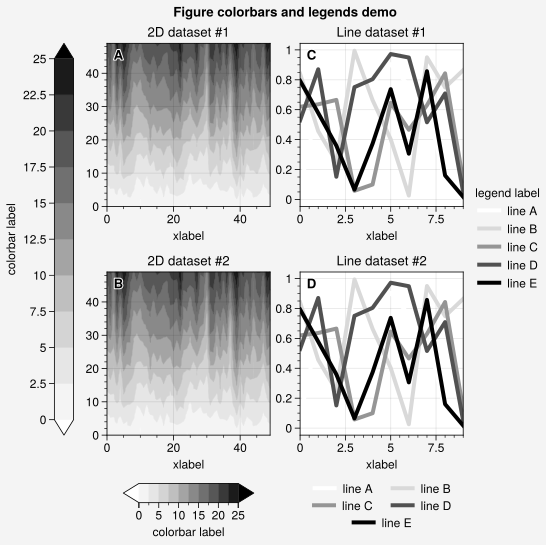
fig.colorbar(m, length=0.8, label="colorbar label", loc="b", col=1, locator=5)
fig.colorbar(m, label="colorbar label", loc="l")
fig.legend(hs, ncols=2, center=True, frame=False, loc="b", col=2)
fig.legend(hs, ncols=1, label="legend label", frame=False, loc="r")
fig.format(abc="A", abcloc="ul", suptitle="Figure colorbars and legends demo")
for ax, title in zip(axs, ("2D {} #1", "2D {} #2", "Line {} #1", "Line {} #2")):
    ax.format(xlabel="xlabel", title=title.format("dataset"))
Added colorbar features
The ultraplot.axes.Axes.colorbar and ultraplot.figure.Figure.colorbar commands are somehwat more flexible than their matplotlib counterparts. The following core features are unique to UltraPlot:
Calling
colorbarwith a list ofArtists, aColormapname or object, or a list of colors will build the required ~matplotlib.cm.ScalarMappable on-the-fly. Lists ofArtistss are used when you use the colorbar keyword with 1D commands likeplot().The associated colormap normalizer can be specified with the vmin, vmax, norm, and norm_kw keywords. The ~ultraplot.colors.DiscreteNorm levels can be specified with values, or UltraPlot will infer them from the
Artistlabels (non-numeric labels will be applied to the colorbar as tick labels). This can be useful for labeling discrete plot elements that bear some numeric relationship to each other.
UltraPlot also includes improvements for adding ticks and tick labels to colorbars.
Similar to ultraplot.axes.CartesianAxes.format(), you can flexibly specify
major tick locations, minor tick locations, and major tick labels using the
locator, minorlocator, formatter, ticks, minorticks, and ticklabels
keywords. These arguments are passed through the Locator and
Formatter constructor functions.
Unlike matplotlib, the default ticks for discrete colormaps
are restricted based on the axis length using ~ultraplot.ticker.DiscreteLocator.
You can easily toggle minor ticks using tickminor=True.
Similar to axes panels, the geometry of UltraPlot colorbars is
specified with physical units (this helps avoid the common issue
where colorbars appear “too skinny” or “too fat” and preserves their appearance
when the figure size changes). You can specify the colorbar width locally using the
width keyword or globally using the rc['colorbar.width'] setting (for outer
colorbars) and the rc['colorbar.insetwidth'] setting (for inset colorbars).
Similarly, you can specify the colorbar length locally with the length keyword or
globally using the rc['colorbar.insetlength'] setting. The outer colorbar length
is always relative to the subplot grid and always has a default of 1. You
can also specify the size of the colorbar “extensions” in physical units rather
than relative units using the extendsize keyword rather than matplotlib’s
extendfrac. The default extendsize values are rc['colorbar.extend'] (for
outer colorbars) and rc['colorbar.insetextend'] (for inset colorbars).
See colorbar() for details.
[6]:
import numpy as np

import ultraplot as uplt

fig = uplt.figure(share=False, refwidth=2)

# Colorbars from lines
ax = fig.subplot(121)
state = np.random.RandomState(51423)
data = 1 + (state.rand(12, 10) - 0.45).cumsum(axis=0)
cycle = uplt.Cycle("algae")
hs = ax.line(
    data,
    lw=4,
    cycle=cycle,
    colorbar="lr",
    colorbar_kw={"length": "8em", "label": "line colorbar"},
)
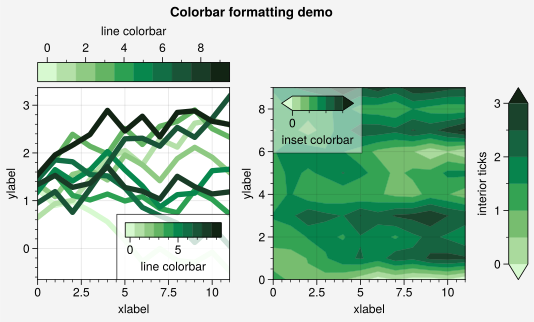
ax.colorbar(hs, loc="t", values=np.arange(0, 10), label="line colorbar", ticks=2)

# Colorbars from a mappable
ax = fig.subplot(122)
m = ax.contourf(data.T, extend="both", cmap="algae", levels=uplt.arange(0, 3, 0.5))
fig.colorbar(
    m, loc="r", length=1, label="interior ticks", tickloc="left"  # length is relative
)
ax.colorbar(
    m,
    loc="ul",
    length=6,  # length is em widths
    label="inset colorbar",
    tickminor=True,
    alpha=0.5,
)
fig.format(
    suptitle="Colorbar formatting demo",
    xlabel="xlabel",
    ylabel="ylabel",
    titleabove=False,
)
Added legend features
The legend() and legend`() commands are
somewhat more flexible than their matplotlib counterparts. The following core
features are the same as matplotlib:
Calling
legendwithout positional arguments will automatically fill the legend with the labeled artist in the the parent axes (when usinglegend()) or or the parent figure (when usinglegend`()).Legend labels can be assigned early by calling plotting comamnds with the label keyword (e.g.,
ax.plot(..., label='label')) or on-the-fly by passing two positional arguments tolegend(where the first argument is the “handle” list and the second is the “label” list).
The following core features are unique to UltraPlot:
Legend labels can be assigned for each column of a 2D array passed to a 1D plotting command using the labels keyword (e.g.,
labels=['label1', 'label2', ...]).Legend labels can be assigned to ~matplotlib.contour.ContourSets by passing the label keyword to a contouring command (e.g.,
contour()orcontourf()).A “handle” list can be passed to
legendas the sole positional argument and the labels will be automatically inferred using ~matplotlib.artist.Artist.get_label. Valid “handles” include ~matplotlib.lines.Line2Ds returned byplot(),BarContainers returned bybar(), andPolyCollections returned byfill_between().A composite handle can be created by grouping the “handle” list objects into tuples (see this matplotlib guide for more on tuple groups). The associated label will be automatically inferred from the objects in the group. If multiple distinct labels are found then the group is automatically expanded.
legend() and ultraplot.figure.Figure.legend() include a few other
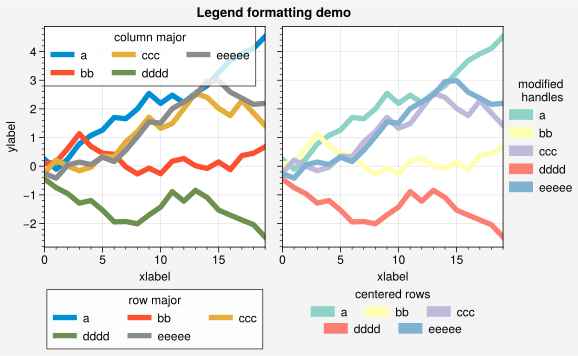
useful features. To draw legends with centered rows, pass center=True or
a list of lists of “handles” to legend (this stacks several single-row,
horizontally centered legends and adds an encompassing frame behind them).
To switch between row-major and column-major order for legend entries,
use the order keyword (the default order='C' is row-major,
unlike matplotlib’s column-major order='F'). To alphabetize the legend
entries, pass alphabetize=True to legend. To modify the legend handles
(e.g., plot() or scatter() handles)
pass the relevant properties like color, linewidth, or markersize to legend
(or use the handle_kw keyword). See ultraplot.axes.Axes.legend for details.
[7]:
import numpy as np

import ultraplot as uplt

uplt.rc.cycle = "538"
fig, axs = uplt.subplots(ncols=2, span=False, share="labels", refwidth=2.3)
labels = ["a", "bb", "ccc", "dddd", "eeeee"]
hs1, hs2 = [], []

# On-the-fly legends
state = np.random.RandomState(51423)
for i, label in enumerate(labels):
    data = (state.rand(20) - 0.45).cumsum(axis=0)
    h1 = axs[0].plot(
        data,
        lw=4,
        label=label,
        legend="ul",
        legend_kw={"order": "F", "title": "column major"},
    )
    hs1.extend(h1)
    h2 = axs[1].plot(
        data,
        lw=4,
        cycle="Set3",
        label=label,
        legend="r",
        legend_kw={"lw": 8, "ncols": 1, "frame": False, "title": "modified\n handles"},
    )
    hs2.extend(h2)

# Outer legends
ax = axs[0]
ax.legend(hs1, loc="b", ncols=3, title="row major", order="C", facecolor="gray2")
ax = axs[1]
ax.legend(hs2, loc="b", ncols=3, center=True, title="centered rows")
axs.format(xlabel="xlabel", ylabel="ylabel", suptitle="Legend formatting demo")
Decoupling legend content and location
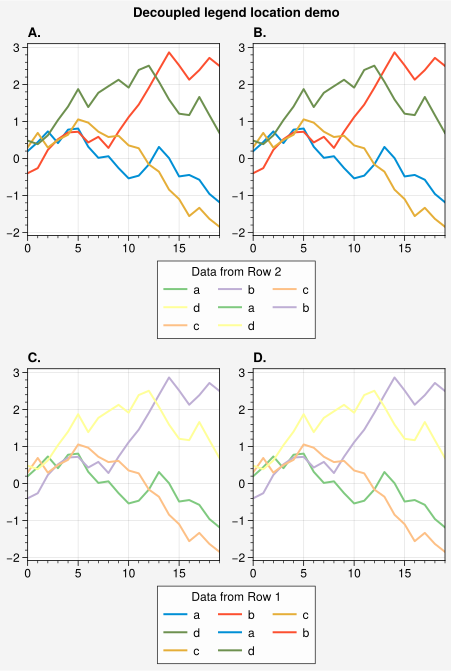
Sometimes you may want to generate a legend using handles from specific axes
but place it relative to other axes. In UltraPlot, you can achieve this by passing
both the ax and ref keywords to legend()
(or colorbar()). The ax keyword specifies the
axes used to generate the legend handles, while the ref keyword specifies the
reference axes used to determine the legend location.
For example, to draw a legend based on the handles in the second row of subplots
but place it below the first row of subplots, you can use
fig.legend(ax=axs[1, :], ref=axs[0, :], loc='bottom'). If ref is a list
of axes, UltraPlot intelligently infers the span (width or height) and anchors
the legend to the appropriate outer edge (e.g., the bottom-most axis for loc='bottom'
or the right-most axis for loc='right').
[8]:
import numpy as np

import ultraplot as uplt

fig, axs = uplt.subplots(nrows=2, ncols=2, refwidth=2, share=False)
axs.format(abc="A.", suptitle="Decoupled legend location demo")

# Plot data on all axes
state = np.random.RandomState(51423)
data = (state.rand(20, 4) - 0.5).cumsum(axis=0)
axs[0, :].plot(data, cycle="538", labels=list("abcd"))
axs[1, :].plot(data, cycle="accent", labels=list("abcd"))

# Legend 1: Content from Row 2 (ax=axs[1, :]), Location below Row 1 (ref=axs[0, :])
# This places a legend describing the bottom row data underneath the top row.
fig.legend(ax=axs[1, :], ref=axs[0, :], loc="bottom", title="Data from Row 2")

# Legend 2: Content from Row 1 (ax=axs[0, :]), Location below Row 2 (ref=axs[1, :])
# This places a legend describing the top row data underneath the bottom row.
fig.legend(ax=axs[0, :], ref=axs[1, :], loc="bottom", title="Data from Row 1")
[8]:
<ultraplot.legend.Legend at 0x77333a137110>