Networks
Visualizing Connections: Graphs!
Networks form a core aspect of any disciplines of science from engineering to biology. UltraPlot supports plotting networks using networkx. It provides an intuitive interface for plotting networks using graph() to plot networks. Plot customization can be passed to the networkx backend, see for full details their documentation.
Layouts can be passed using strings, dicts or functions as long as they are compatible with networkx’s layout functions.
Minimal Example
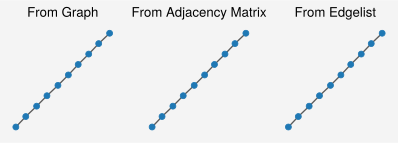
To plot a graph, use graph(). You need to merely provide a graph and UltraPlot will take care of the rest. UltraPlot will automatically style the layout to give sensible default. Every setting can be overidden if the user wants to customize the nodes, edges, or layout.
By default, UltraPlot automatically styles the plot by removing the background and spines, and adjusting the layout to fit within a normalized [0,1] coordinate box. It also applies an equal aspect ratio to ensure square dimensions, which is ideal for the default circular markers. Additional customization—such as modifying labels, legends, axis limits, and more—can be done using format() to override the default styling.
[1]:
import networkx as nx, ultraplot as uplt, numpy as np

g = nx.path_graph(10)
A = nx.to_numpy_array(g)
el = np.array(g.edges())

fig, ax = uplt.subplots(ncols=3, refheight="3cm")
ax[0].graph(g)  # We can plot graphs
ax[1].graph(A)  # Or adjacency matrices and edgeslists
ax[2].graph(el)
ax.format(title=["From Graph", "From Adjacency Matrix", "From Edgelist"])
uplt.show()
More Advanced Customization
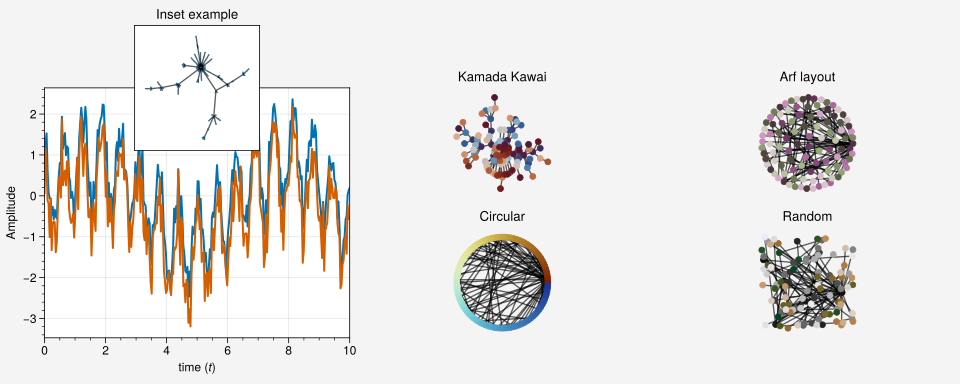
To customize a network plot, you can pass a dictionary of parameters to the graph() function. These parameters are passed to the networkx backend, so you can refer to their documentation for more details (draw(), draw_networkx(), draw_networkx_nodes(), draw_networkx_edges(), draw_networkx_labels()). A more complicated example is shown below.
[2]:
import networkx as nx, ultraplot as uplt, numpy as np

# Generate some mock data
g = nx.gn_graph(n=100).to_undirected()
x = np.linspace(0, 10, 300)
y = np.sin(x) + np.cos(10 * x) + np.random.randn(*x.shape) * 0.3
layout = [[1, 2, 3], [1, 4, 5]]
fig, ax = uplt.subplots(layout, share=0, figsize=(10, 4))

# Plot network on an inset
inax = ax[0].inset_axes([0.25, 0.75, 0.5, 0.5], zoom=False)
ax[0].plot(x, y)
ax[0].plot(x, y - np.random.rand(*x.shape))
ax[0].format(xlabel="time $(t)$", ylabel="Amplitude", title="Inset example")
inax.graph(
    g,
    layout="forceatlas2",
    node_kw=dict(node_size=0.2),
)
inax.format(
    facecolor="white",
    xspineloc="both",
    yspineloc="both",
)

# Show off different way of parsing inputs. When None is set it defaults to a Kamada Kawai
circular = nx.circular_layout(g)
layouts = [None, nx.arf_layout, circular, "random"]
names = ["Kamada Kawai", "Arf layout", "Circular", "Random"]
cmaps = ["viko", "bamo", "roma", "fes"]
for axi, layout, name, cmap in zip(ax[1:], layouts, names, cmaps):
    cmap = uplt.colormaps.get_cmap(cmap)
    colors = cmap(np.linspace(0, 1, g.number_of_nodes(), 0))
    axi.graph(g, layout=layout, node_kw=dict(node_color=colors))
    axi.set_title(name)
uplt.show()