Colormaps
UltraPlot defines continuous colormaps as color palettes that sample some
continuous function between two end colors. They are generally used
to encode data values on a pseudo-third dimension. They are implemented
in UltraPlot with the ContinuousColormap and
PerceptualColormap classes, which are
subclassed from
LinearSegmentedColormap.
UltraPlot adds several features to help you use colormaps effectively in your figures. This section documents the new registered colormaps, explains how to make and modify colormaps, and shows how to apply them to your plots.
Included colormaps
On import, UltraPlot registers a few sample
perceptually uniform colormaps, plus several
colormaps from other online data viz projects. Use show_cmaps()
to generate a table of registered colormaps. The figure is broken down into
the following sections:
“User” colormaps created with
Colormapor loaded fromuser_folder().Matplotlib and seaborn original colormaps.
UltraPlot original perceptually uniform colormaps.
The cmOcean colormaps, designed for oceanographic data but useful for everyone.
Fabio Crameri’s “scientific colour maps”.
Cynthia Brewer’s ColorBrewer colormaps, included with matplotlib by default.
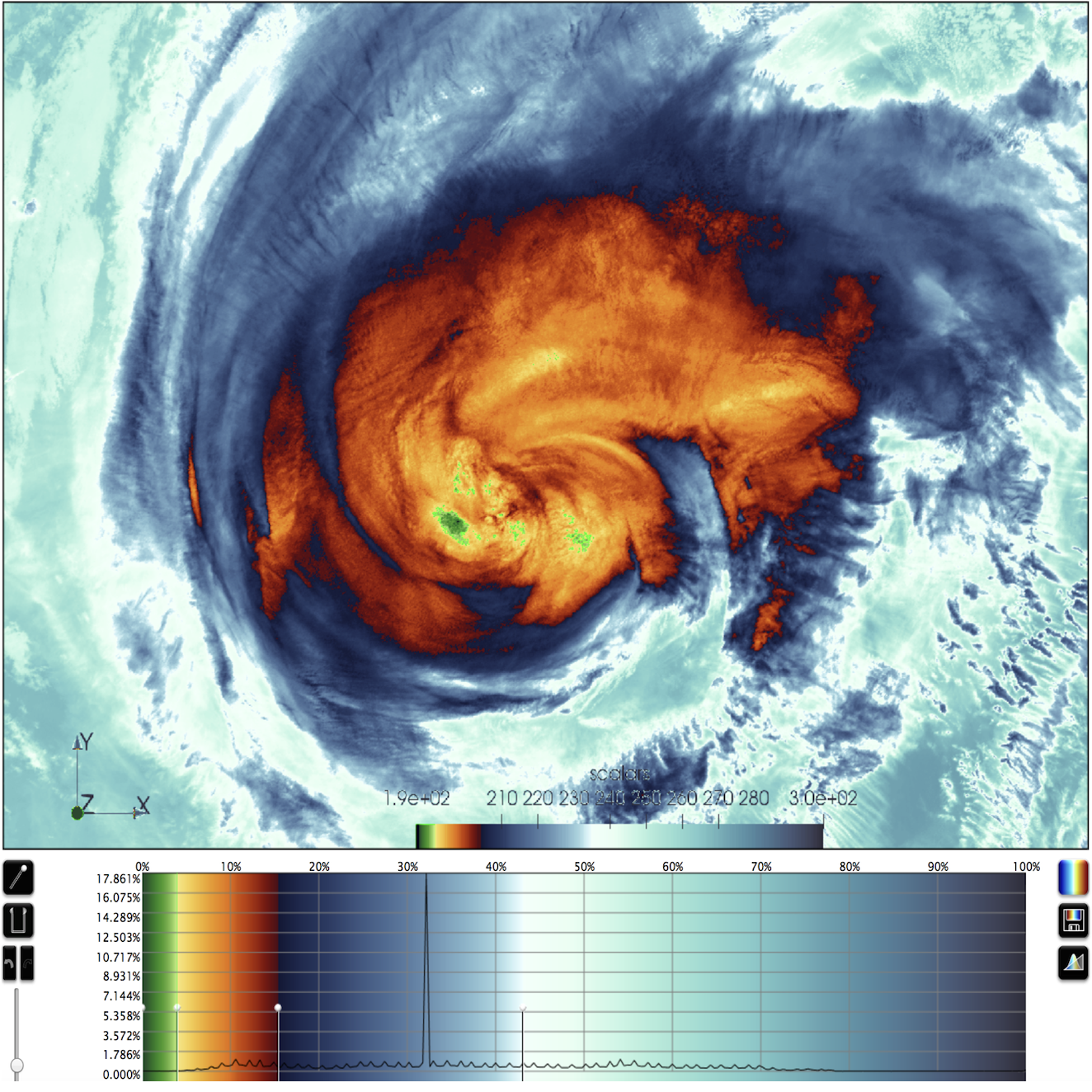
Colormaps from the SciVisColor project. There are so many of these because they are intended to be merged into more complex colormaps.
Matplotlib colormaps with erratic color transitions like 'jet' are still
registered, but they are hidden from this table by default, and their usage is
discouraged. If you need a list of colors associated with a registered or
on-the-fly colormap, simply use get_colors().
Note
Colormap and color cycle identification is more flexible in
UltraPlot. The names are are case-insensitive (e.g., 'Viridis', 'viridis',
and 'ViRiDiS' are equivalent), diverging colormap names can be specified in
their “reversed” form (e.g., 'BuRd' is equivalent to 'RdBu_r'), and
appending '_r' or '_s' to any colormap name will return a
reversed or
shifted version of the colormap
or color cycle. See ColormapDatabase for more info.
[1]:
import ultraplot as uplt

fig, axs = uplt.show_cmaps(rasterized=True)

Perceptually uniform colormaps
UltraPlot’s custom colormaps are instances of the
PerceptualColormap class. These colormaps
generate colors by interpolating between coordinates in any
of the following three hue-saturation-luminance colorspaces:
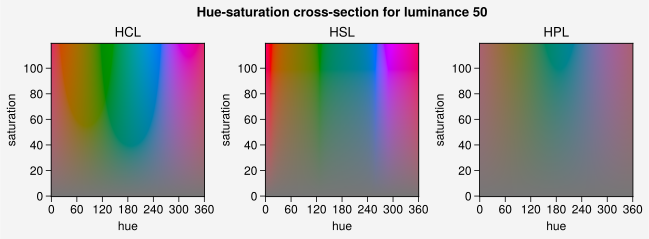
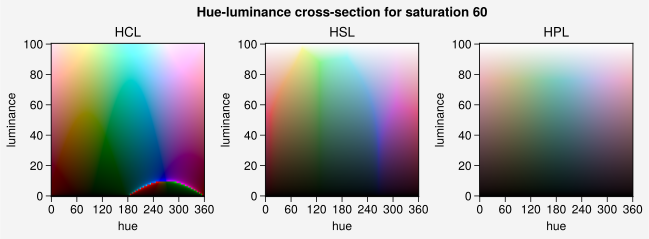
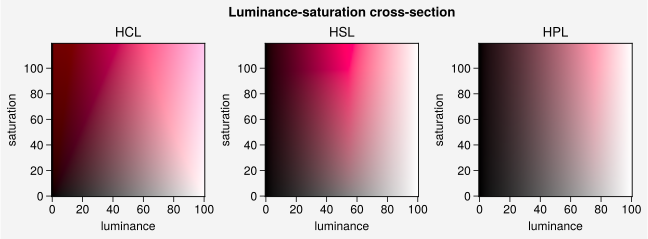
HCL (a.k.a. CIE LChuv): A purely perceptually uniform colorspace, where colors are broken down into “hue” (color, range 0-360), “chroma” (saturation, range 0-100), and “luminance” (brightness, range 0-100). This colorspace is difficult to work with due to impossible colors – colors that, when translated back from HCL to RGB, result in RGB channels greater than
1.HPL (a.k.a. HPLuv): Hue and luminance are identical to HCL, but 100 saturation is set to the minimum maximum saturation across all hues for a given luminance. HPL restricts you to soft pastel colors, but is closer to HCL in terms of uniformity.
HSL (a.k.a. HSLuv): Hue and luminance are identical to HCL, but 100 saturation is set to the maximum saturation for a given hue and luminance. HSL gives you access to the entire RGB colorspace, but often results in sharp jumps in chroma.
The colorspace used by a PerceptualColormap
is set with the space keyword arg. To plot arbitrary cross-sections of
these colorspaces, use show_colorspaces() (the black
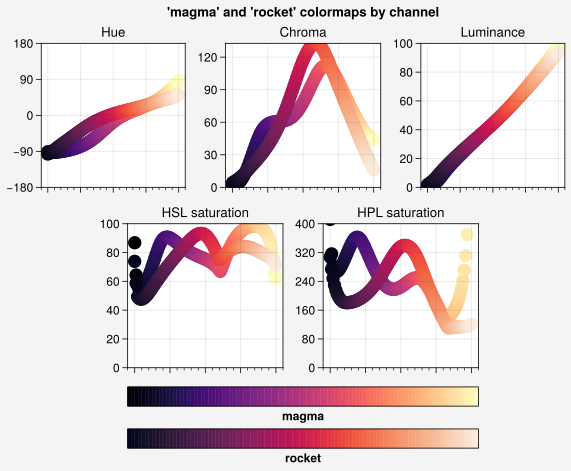
regions represent impossible colors). To see how colormaps vary with
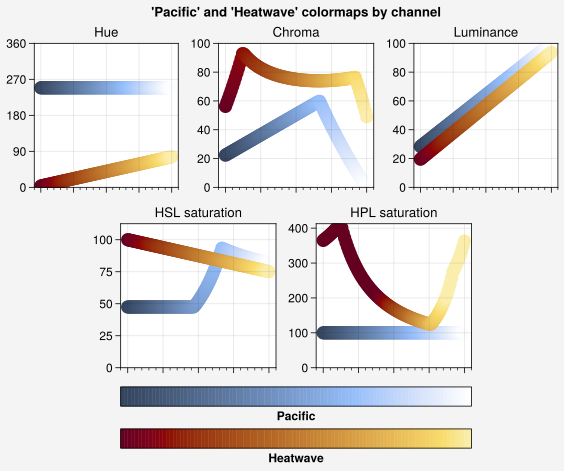
respect to each channel, use show_channels(). Some examples
are shown below.
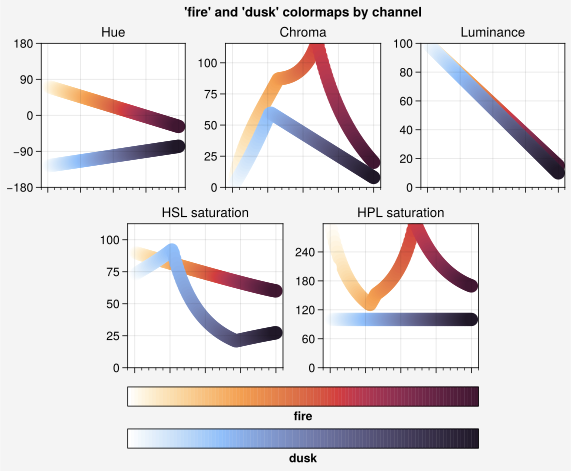
In theory, “uniform” colormaps should have straight lines in hue, chroma,
and luminance (second figure, top row). In practice, this is
difficult to accomplish due to impossible colors. Matplotlib’s and seaborn’s
'magma' and 'Rocket' colormaps are fairly linear with respect to
hue and luminance, but not chroma. UltraPlot’s 'Fire' is linear in hue,
luminance, and HSL saturation (bottom left), while 'Dusk' is linear
in hue, luminance, and HPL saturation (bottom right).
[2]:
# Colorspace demo
import ultraplot as uplt

fig, axs = uplt.show_colorspaces(refwidth=1.6, luminance=50)
fig, axs = uplt.show_colorspaces(refwidth=1.6, saturation=60)
fig, axs = uplt.show_colorspaces(refwidth=1.6, hue=0)
[3]:
# Compare colormaps
import ultraplot as uplt

for cmaps in (("magma", "rocket"), ("fire", "dusk")):
    fig, axs = uplt.show_channels(
        *cmaps, refwidth=1.5, minhue=-180, maxsat=400, rgb=False
    )
Making colormaps
UltraPlot includes tools for merging colormaps, modifying existing colormaps,
making new perceptually uniform colormaps, and
saving colormaps for future use. Most of these features can be accessed via the
Colormap constructor function.
Note that every PlotAxes command that accepts a cmap keyword passes
it through this function (see the 2D plotting section).
To make PerceptualColormaps from
scratch, you have the following three options:
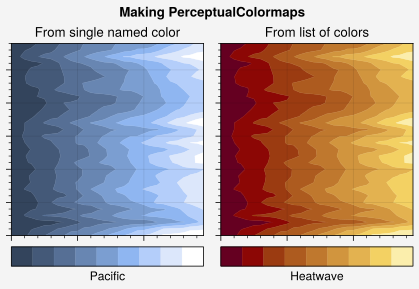
Pass a color name, HEX string, or RGB tuple to
Colormap. This builds a monochromatic (single hue) colormap by callingfrom_color(). The colormap colors will progress from the specified color to a color with the same hue but changed saturation or luminance. These can be set with the saturation and luminance keywords (or their shorthands s and l). By default, the colormap will progress to pure white.Pass a list of color names, HEX strings, or RGB tuples to
Colormap. This callsfrom_list(), which linearly interpolates between the hues, saturations, and luminances of the input colors. To facillitate the construction of diverging colormaps, the hue channel values for nuetral colors (i.e., white, black, and gray) are adjusted to the hues of the preceding and subsequent colors in the list, with sharp hue cutoffs at the neutral colors. This permits generating diverging colormaps with e.g.['blue', 'white', 'red'].Pass the keywords hue, saturation, or luminance (or their shorthands h, s, and l) to
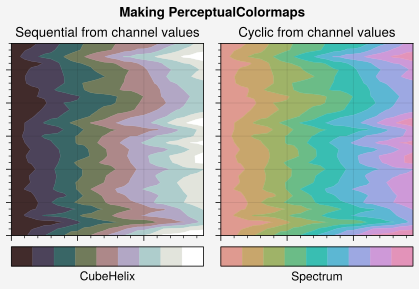
Colormapwithout any positional arguments (or pass a dictionary containing these keys as a positional argument). This callsfrom_hsl(), which linearly interpolates between the specified channel values. Channel values can be specified with numbers between0and100, color strings, or lists thereof. For color strings, the value is inferred from the specified color. You can end any color string with'+N'or'-N'to offset the channel value by the numberN(e.g.,hue='red+50').
To change the colorspace used to construct the colormap,
use the space keyword. The default colorspace is 'hsl'. In the below example,
we use all of these methods to make PerceptualColormaps
in the 'hsl' and 'hpl' colorspaces.
[4]:
# Sample data
import ultraplot as uplt
import numpy as np

state = np.random.RandomState(51423)
data = state.rand(30, 30).cumsum(axis=1)
[5]:
# Colormap from a color
# The trailing '_r' makes the colormap go dark-to-light instead of light-to-dark
fig = uplt.figure(refwidth=2, span=False)
ax = fig.subplot(121, title="From single named color")
cmap1 = uplt.Colormap("prussian blue_r", l=100, name="Pacific", space="hpl")
m = ax.contourf(data, cmap=cmap1)
ax.colorbar(m, loc="b", ticks="none", label=cmap1.name)

# Colormap from lists
ax = fig.subplot(122, title="From list of colors")
cmap2 = uplt.Colormap(("maroon", "light tan"), name="Heatwave")
m = ax.contourf(data, cmap=cmap2)
ax.colorbar(m, loc="b", ticks="none", label=cmap2.name)
fig.format(
    xticklabels="none", yticklabels="none", suptitle="Making PerceptualColormaps"
)

# Display the channels
fig, axs = uplt.show_channels(cmap1, cmap2, refwidth=1.5, rgb=False)
[6]:
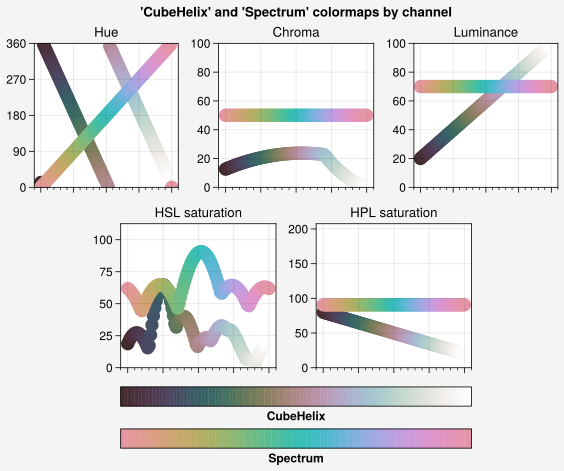
# Sequential colormap from channel values
cmap3 = uplt.Colormap(
    h=("red", "red-720"), s=(80, 20), l=(20, 100), space="hpl", name="CubeHelix"
)
fig = uplt.figure(refwidth=2, span=False)
ax = fig.subplot(121, title="Sequential from channel values")
m = ax.contourf(data, cmap=cmap3)
ax.colorbar(m, loc="b", ticks="none", label=cmap3.name)

# Cyclic colormap from channel values
ax = fig.subplot(122, title="Cyclic from channel values")
cmap4 = uplt.Colormap(h=(0, 360), c=50, l=70, space="hcl", cyclic=True, name="Spectrum")
m = ax.contourf(data, cmap=cmap4)
ax.colorbar(m, loc="b", ticks="none", label=cmap4.name)
fig.format(
    xticklabels="none", yticklabels="none", suptitle="Making PerceptualColormaps"
)

# Display the channels
fig, axs = uplt.show_channels(cmap3, cmap4, refwidth=1.5, rgb=False)
Merging colormaps
To merge colormaps, you can pass multiple positional arguments to the
Colormap constructor function. This calls the
append() method. Each positional
argument can be a colormap name, a colormap instance, or a
special argument that generates a new colormap
on-the-fly. This lets you create new diverging colormaps and segmented
SciVisColor style colormaps
right inside UltraPlot. Segmented colormaps are often desirable for complex
datasets with complex statistical distributions.
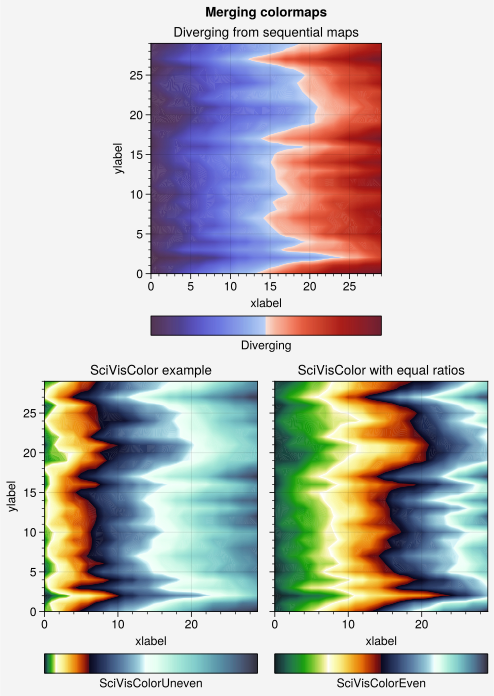
In the below example, we create a new divering colormap and
reconstruct the colormap from this SciVisColor example.
We also save the results for future use by passing save=True to
Colormap.
[7]:
import ultraplot as uplt
import numpy as np

state = np.random.RandomState(51423)
data = state.rand(30, 30).cumsum(axis=1)

# Generate figure
fig, axs = uplt.subplots([[0, 1, 1, 0], [2, 2, 3, 3]], refwidth=2.4, span=False)
axs.format(xlabel="xlabel", ylabel="ylabel", suptitle="Merging colormaps")

# Diverging colormap example
title1 = "Diverging from sequential maps"
cmap1 = uplt.Colormap("Blues4_r", "Reds3", name="Diverging", save=True)

# SciVisColor examples
title2 = "SciVisColor example"
cmap2 = uplt.Colormap(
    "Greens1_r",
    "Oranges1",
    "Blues1_r",
    "Blues6",
    ratios=(1, 3, 5, 10),
    name="SciVisColorUneven",
    save=True,
)
title3 = "SciVisColor with equal ratios"
cmap3 = uplt.Colormap(
    "Greens1_r", "Oranges1", "Blues1_r", "Blues6", name="SciVisColorEven", save=True
)

# Plot examples
for ax, cmap, title in zip(axs, (cmap1, cmap2, cmap3), (title1, title2, title3)):
    m = ax.contourf(data, cmap=cmap, levels=500)
    ax.colorbar(m, loc="b", locator="null", label=cmap.name)
    ax.format(title=title)
Saved colormap to '/home/docs/.config/ultraplot/cmaps/Diverging.json'.
Saved colormap to '/home/docs/.config/ultraplot/cmaps/SciVisColorUneven.json'.
Saved colormap to '/home/docs/.config/ultraplot/cmaps/SciVisColorEven.json'.
Modifying colormaps
UltraPlot lets you create modified versions of existing colormaps
using the Colormap constructor function and the
new ContinuousColormap and
DiscreteColormap classes, which replace the native
matplotlib colormap classes. They can be modified in the following ways:
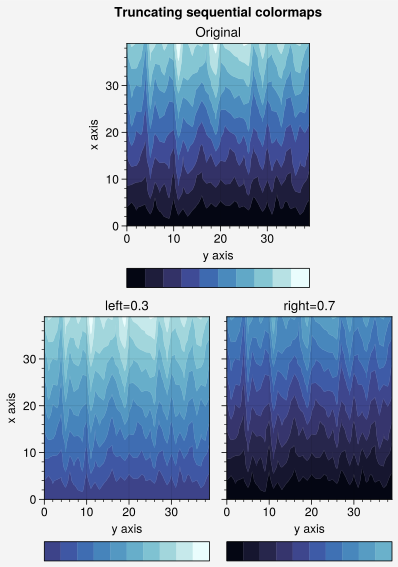
To remove colors from the left or right ends of a colormap, pass left or right to
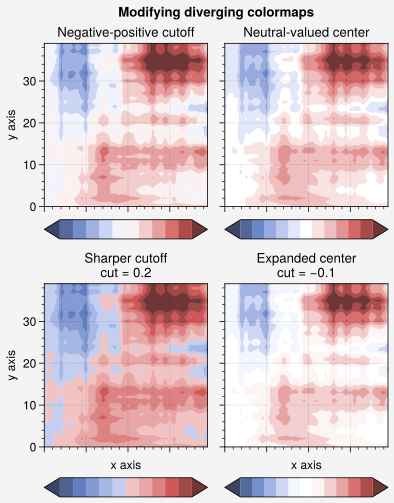
Colormap. This calls thetruncate()method, and can be useful when you want to use colormaps as color cycles and need to remove the light part so that your lines stand out against the background.To modify the central colors of a diverging colormap, pass cut to
Colormap. This calls thecut()method, and can be used to create a sharper cutoff between negative and positive values or (when cut is negative) to expand the “neutral” region of the colormap.To rotate a cyclic colormap, pass shift to
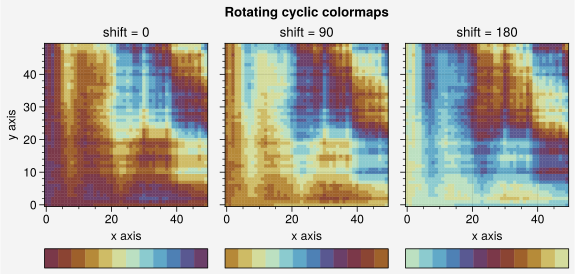
Colormap. This calls theshifted()method. UltraPlot ensures the colors at the ends of “shifted” colormaps are distinct so that levels never blur together.To change the opacity of a colormap or add an opacity gradation, pass alpha to
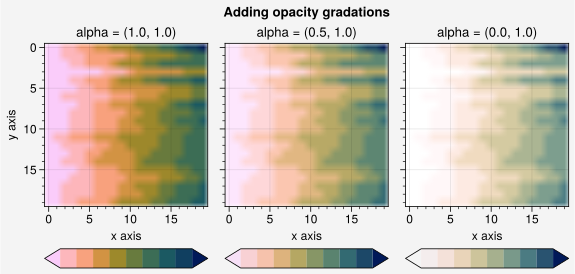
Colormap. This calls theset_alpha()method, and can be useful when layering filled contour or mesh elements.To change the “gamma” of a
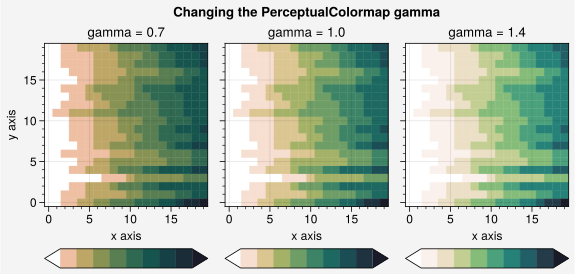
PerceptualColormap, pass gamma toColormap. This calls theset_gamma()method, and controls how the luminance and saturation channels vary between colormap segments.gamma > 1emphasizes high luminance, low saturation colors, whilegamma < 1emphasizes low luminance, high saturation colors. This is similar to the effect of the HCL wizard “power” sliders.
[8]:
import ultraplot as uplt
import numpy as np

state = np.random.RandomState(51423)
data = state.rand(40, 40).cumsum(axis=0)

# Generate figure
fig, axs = uplt.subplots([[0, 1, 1, 0], [2, 2, 3, 3]], refwidth=1.9, span=False)
axs.format(xlabel="y axis", ylabel="x axis", suptitle="Truncating sequential colormaps")

# Cutting left and right
cmap = "Ice"
for ax, coord in zip(axs, (None, 0.3, 0.7)):
    if coord is None:
        title, cmap_kw = "Original", {}
    elif coord < 0.5:
        title, cmap_kw = f"left={coord}", {"left": coord}
    else:
        title, cmap_kw = f"right={coord}", {"right": coord}
    ax.format(title=title)
    ax.contourf(
        data, cmap=cmap, cmap_kw=cmap_kw, colorbar="b", colorbar_kw={"locator": "null"}
    )
[9]:
import ultraplot as uplt
import numpy as np

state = np.random.RandomState(51423)
data = (state.rand(40, 40) - 0.5).cumsum(axis=0).cumsum(axis=1)

# Create figure
fig, axs = uplt.subplots(ncols=2, nrows=2, refwidth=1.7, span=False)
axs.format(
    xlabel="x axis",
    ylabel="y axis",
    xticklabels="none",
    suptitle="Modifying diverging colormaps",
)

# Cutting out central colors
titles = (
    "Negative-positive cutoff",
    "Neutral-valued center",
    "Sharper cutoff",
    "Expanded center",
)
for i, (ax, title, cut) in enumerate(zip(axs, titles, (None, None, 0.2, -0.1))):
    if i % 2 == 0:
        kw = {"levels": uplt.arange(-10, 10, 2)}  # negative-positive cutoff
    else:
        kw = {"values": uplt.arange(-10, 10, 2)}  # dedicated center
    if cut is not None:
        fmt = uplt.SimpleFormatter()  # a proper minus sign
        title = f"{title}\ncut = {fmt(cut)}"
    ax.format(title=title)
    m = ax.contourf(
        data,
        cmap="Div",
        cmap_kw={"cut": cut},
        extend="both",
        colorbar="b",
        colorbar_kw={"locator": "null"},
        **kw,  # level edges or centers
    )
[10]:
import ultraplot as uplt
import numpy as np

state = np.random.RandomState(51423)
data = (state.rand(50, 50) - 0.48).cumsum(axis=0).cumsum(axis=1) % 30

# Rotating cyclic colormaps
fig, axs = uplt.subplots(ncols=3, refwidth=1.7, span=False)
for ax, shift in zip(axs, (0, 90, 180)):
    m = ax.pcolormesh(data, cmap="romaO", cmap_kw={"shift": shift}, levels=12)
    ax.format(
        xlabel="x axis",
        ylabel="y axis",
        title=f"shift = {shift}",
        suptitle="Rotating cyclic colormaps",
    )
    ax.colorbar(m, loc="b", locator="null")
[11]:
import ultraplot as uplt
import numpy as np

state = np.random.RandomState(51423)
data = state.rand(20, 20).cumsum(axis=1)

# Changing the colormap opacity
fig, axs = uplt.subplots(ncols=3, refwidth=1.7, span=False)
for ax, alpha in zip(axs, (1.0, 0.5, 0.0)):
    alpha = (alpha, 1.0)
    cmap = uplt.Colormap("batlow_r", alpha=alpha)
    m = ax.imshow(data, cmap=cmap, levels=10, extend="both")
    ax.colorbar(m, loc="b", locator="none")
    ax.format(
        title=f"alpha = {alpha}",
        xlabel="x axis",
        ylabel="y axis",
        suptitle="Adding opacity gradations",
    )
[12]:
import ultraplot as uplt
import numpy as np

state = np.random.RandomState(51423)
data = state.rand(20, 20).cumsum(axis=1)

# Changing the colormap gamma
fig, axs = uplt.subplots(ncols=3, refwidth=1.7, span=False)
for ax, gamma in zip(axs, (0.7, 1.0, 1.4)):
    cmap = uplt.Colormap("boreal", gamma=gamma)
    m = ax.pcolormesh(data, cmap=cmap, levels=10, extend="both")
    ax.colorbar(m, loc="b", locator="none")
    ax.format(
        title=f"gamma = {gamma}",
        xlabel="x axis",
        ylabel="y axis",
        suptitle="Changing the PerceptualColormap gamma",
    )
Downloading colormaps
There are several interactive online tools for generating perceptually uniform colormaps, including Chroma.js, HCLWizard, HCL picker, SciVisColor, and CCC-tool.
To add colormaps downloaded from any of these sources, save the color data file
to the cmaps subfolder inside user_folder(),
or to a folder named ultraplot_cmaps in the same directory as your python session
or an arbitrary parent directory (see local_folders()).
After adding the file, call register_cmaps() or restart your python
session. You can also use from_file() or manually
pass ContinuousColormap instances or file paths to
register_cmaps(). See register_cmaps()
for a table of recognized file extensions.