Geographic and polar axes
This section documents several useful features for working with polar plots and geographic projections. The geographic features are powered by cartopy (or, optionally, basemap). Note that these features are optional – installation of cartopy or basemap are not required to use UltraPlot.
Polar axes
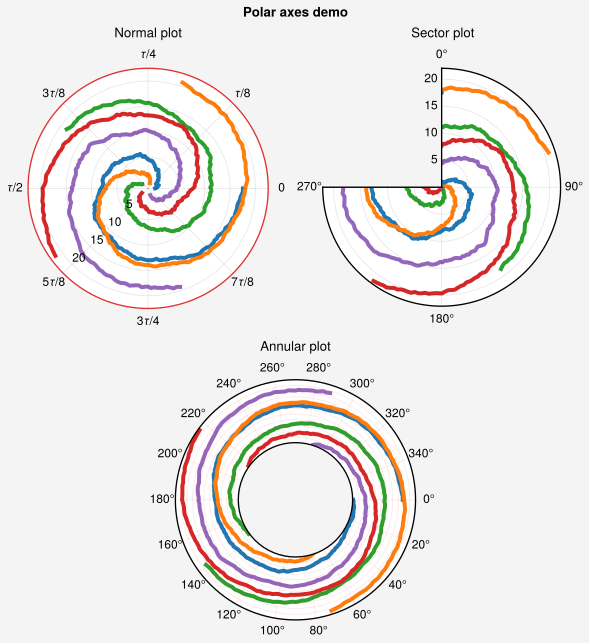
To create polar axes, pass proj='polar' to an axes-creation
command like ultraplot.figure.Figure.add_subplot(). Polar axes are represented with the
PolarAxes subclass, which has its own format()
command. ultraplot.axes.PolarAxes.format() facilitates polar-specific modifications
like changing the central radius r0, the zero azimuth location theta0,
and the positive azimuthal direction thetadir. It also supports toggling and
configuring the “major” and “minor” gridline locations with grid, rlocator,
thetalocator, gridminor, rminorlocator, and thetaminorlocator and formatting
the gridline labels with rformatter and thetaformatter (analogous to xlocator,
xformatter, and xminorlocator used by ultraplot.axes.CartesianAxes.format()),
and creating “annular” or “sector” plots by changing the radial or azimuthal
bounds rlim and thetalim. Finally, since ultraplot.axes.PolarAxes.format()
calls ultraplot.axes.Axes.format(), it can be used to add axes titles, a-b-c
labels, and figure titles.
For details, see ultraplot.axes.PolarAxes.format().
[1]:
import ultraplot as uplt
import numpy as np

N = 200
state = np.random.RandomState(51423)
x = np.linspace(0, 2 * np.pi, N)[:, None] + np.arange(5) * 2 * np.pi / 5
y = 100 * (state.rand(N, 5) - 0.3).cumsum(axis=0) / N
fig, axs = uplt.subplots([[1, 1, 2, 2], [0, 3, 3, 0]], proj="polar", share=0)
axs.format(
    suptitle="Polar axes demo",
    linewidth=1,
    titlepad="1em",
    ticklabelsize=9,
    rlines=0.5,
    rlim=(0, 19),
)
for ax in axs:
    ax.plot(x, y, cycle="default", zorder=0, lw=3)

# Standard polar plot
axs[0].format(
    title="Normal plot",
    thetaformatter="tau",
    rlabelpos=225,
    rlines=uplt.arange(5, 30, 5),
    edgecolor="red8",
    tickpad="1em",
)

# Sector plot
axs[1].format(
    title="Sector plot",
    thetadir=-1,
    thetalines=90,
    thetalim=(0, 270),
    theta0="N",
    rlim=(0, 22),
    rlines=uplt.arange(5, 30, 5),
)

# Annular plot
axs[2].format(
    title="Annular plot",
    thetadir=-1,
    thetalines=20,
    gridcolor="red",
    r0=-20,
    rlim=(0, 22),
    rformatter="null",
    rlocator=2,
)
/home/docs/checkouts/readthedocs.org/user_builds/ultraplot/conda/465/lib/python3.13/site-packages/IPython/core/events.py:96: UltraPlotWarning: Tick label sharing not implemented for <class 'ultraplot.axes.polar.PolarAxes'> subplots.
  func(*args, **kwargs)
/home/docs/checkouts/readthedocs.org/user_builds/ultraplot/conda/465/lib/python3.13/site-packages/IPython/core/pylabtools.py:170: UltraPlotWarning: Tick label sharing not implemented for <class 'ultraplot.axes.polar.PolarAxes'> subplots.
  fig.canvas.print_figure(bytes_io, **kw)
Geographic axes
To create geographic axes, pass proj='name' to an axes-creation command like
ultraplot.figure.Figure.add_subplot(), where name is any valid PROJ projection
name. Alternatively, you can pass a cartopy.crs.Projection or
Basemap instance returned by the Proj
constructor function to proj (see below for details). If
you want to create your subplots all-at-once with e.g.
subplots() but need different projections for each subplot, you can pass
a list or dictionary to the proj keyword (e.g., proj=('cartesian', 'pcarree')
or proj={2: 'pcarree'} – see subplots() for details).
Geographic axes are represented with the GeoAxes subclass, which
has its own format() command. ultraplot.axes.GeoAxes.format()
facilitates geographic-specific modifications like meridional
and parallel gridlines and land mass outlines. The syntax is very similar to
ultraplot.axes.CartesianAxes.format().
Important
The internal reference system used for plotting in ultraplot is PlateCarree. External libraries, such as contextily, may use different internal reference systems, such as EPSG:3857 (Web Mercator). When interfacing with such libraries, it is important to provide the appropriate transform parameter to ensure proper alignment between coordinate systems.
Note that the proj keyword and several of
the format() keywords are inspired by the basemap API.
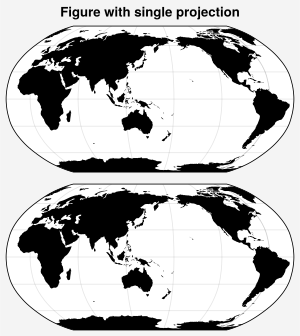
In the below example, we create and format a very simple geographic plot.
[2]:
# Use an on-the-fly projection
import ultraplot as uplt

fig = uplt.figure(refwidth=3, share=0)
axs = fig.subplots(
    nrows=2,
    proj="robin",
    proj_kw={"lon0": 150},
)
axs.format(
    suptitle="Figure with single projection",
    land=True,
    latlines=30,
    lonlines=60,
)
Geographic backends
The GeoAxes class uses either cartopy or basemap as “backends”
to format the axes and plot stuff in
the axes. A few details:
Cartopy is the default backend. When you request projection names with cartopy as the backend (or pass a
cartopy.crs.Projectionto the proj keyword), the returned axes is a subclass ofcartopy.mpl.geoaxes.GeoAxes. Under the hood, invokingformat()with cartopy as the backend changes map bounds usingset_extent(), adds major and minor gridlines usinggridlines, and adds geographic features usingadd_feature(). If you prefer, you can use the standardcartopy.mpl.geoaxes.GeoAxesmethods just like you would in cartopy. If you need to use the underlyingProjectioninstance, it is available via theprojection()attribute. If you want to work with the projection classes directly, they are available in the top-level namespace (e.g.,proj=uplt.PlateCarre()is allowed).Basemap is an alternative backend. To use basemap, set
rc['geo.backend']to'basemap'or passbackend='basemap'to the axes-creation command. When you request a projection name with basemap as the backend (or pass aBasemapto the proj keyword), the returned axes redirects the plotting methods plot, scatter, contour, contourf, pcolor, pcolormesh, quiver, streamplot, and barb to the identically named methods on theBasemapinstance. This means you can work with the standard axes plotting methods rather than the basemap methods – just like cartopy. Under the hood, invokingformat()with basemap as the backend adds major and minor gridlines usingdrawmeridians()anddrawparallels()and adds geographic features using methods likefillcontinents()anddrawcoastlines(). If you need to use the underlyingBasemapinstance, it is available as theprojectionattribute.
Together, these features let you work with geophysical data without invoking
verbose cartopy classes like LambertAzimuthalEqualArea or
keeping track of separate Basemap instances. This
considerably reduces the amount of code needed to make complex geographic
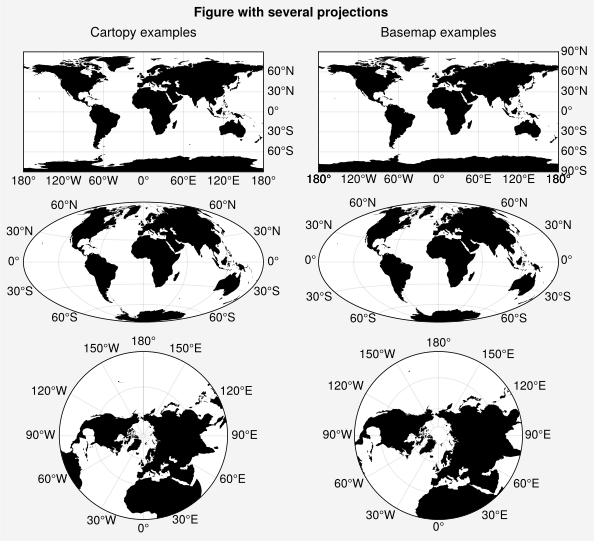
plots. In the below examples, we create a variety of plots using both
cartopy and basemap as backends.
Important
By default, UltraPlot bounds polar cartopy projections like :classs:`~cartopy.crs.NorthPolarStereo` at the equator and gives non-polar cartopy projections global extent by calling
set_global(). This is a deviation from cartopy, which determines map boundaries automatically based on the coordinates of the plotted content. To revert to cartopy’s default behavior, setrc['geo.extent']to'autoor passextent='auto'toformat().By default, UltraPlot gives circular boundaries to polar cartopy and basemap projections like
NorthPolarStereo(see this example from the cartopy website). To disable this feature, setrc['geo.round']toFalseor pass ``round=False` toformat(). Please note that older versions of cartopy cannot add gridlines to maps bounded by circles.To make things more consistent, the
Projconstructor function lets you supply native PROJ keyword names for the cartopyProjectionclasses (e.g., lon0 instead of central_longitude) and instantiatesBasemapprojections with sensible default PROJ parameters rather than raising an error when they are omitted (e.g.,lon0=0as the default for most projections).
Warning
The basemap package is now being actively maintained again with a short hiatus for a few years. We originally included basemap support because its gridline labeling was more powerful than cartopy gridline labeling. While cartopy gridline labeling has significantly improved since version 0.18, UltraPlot continues to support both mapping libraries to give users flexibility in their visualization choices.
[3]:
import ultraplot as uplt

fig = uplt.figure(share=0)

# Add projections
gs = uplt.GridSpec(ncols=2, nrows=3, hratios=(1, 1, 1.4))
for i, proj in enumerate(("cyl", "hammer", "npstere")):
    ax1 = fig.subplot(gs[i, 0], proj=proj)  # default cartopy backend
    ax2 = fig.subplot(gs[i, 1], proj=proj, backend="basemap")  # basemap backend

# Format projections
axs = fig.subplotgrid
axs.format(
    land=True,
    suptitle="Figure with several projections",
    toplabels=("Cartopy examples", "Basemap examples"),
    toplabelweight="normal",
    latlines=30,
    lonlines=60,
)
axs[:2].format(lonlabels="b", latlabels="r")  # or lonlabels=True, lonlabels='bottom',
axs[2:4].format(lonlabels=False, latlabels="both")
axs[4:].format(lonlabels="all", lonlines=30)
uplt.rc.reset()
/tmp/ipykernel_3987/3238788076.py:9: UltraPlotWarning: backend='basemap' will be deprecated in next major release (v2.0). See https://github.com/Ultraplot/ultraplot/pull/243
  ax2 = fig.subplot(gs[i, 1], proj=proj, backend="basemap")  # basemap backend
/tmp/ipykernel_3987/3238788076.py:9: UltraPlotWarning: backend='basemap' will be deprecated in next major release (v2.0). See https://github.com/Ultraplot/ultraplot/pull/243
  ax2 = fig.subplot(gs[i, 1], proj=proj, backend="basemap")  # basemap backend
/tmp/ipykernel_3987/3238788076.py:9: UltraPlotWarning: backend='basemap' will be deprecated in next major release (v2.0). See https://github.com/Ultraplot/ultraplot/pull/243
  ax2 = fig.subplot(gs[i, 1], proj=proj, backend="basemap")  # basemap backend
/home/docs/checkouts/readthedocs.org/user_builds/ultraplot/conda/465/lib/python3.13/site-packages/IPython/core/events.py:96: UltraPlotWarning: Tick label sharing not implemented for mixed subplot types.
  func(*args, **kwargs)
/home/docs/checkouts/readthedocs.org/user_builds/ultraplot/conda/465/lib/python3.13/site-packages/IPython/core/pylabtools.py:170: UltraPlotWarning: Tick label sharing not implemented for mixed subplot types.
  fig.canvas.print_figure(bytes_io, **kw)
Plotting in projections
In UltraPlot, plotting with GeoAxes is just like plotting
with CartesianAxes. UltraPlot makes longitude-latitude
(i.e., Plate Carrée) coordinates the default coordinate system for all plotting
commands by internally passing transform=ccrs.PlateCarree() to cartopy commands
and latlon=True to basemap commands. And again, when basemap is the backend,
plotting is done “cartopy-style” by calling methods from the ultraplot.axes.GeoAxes
instance rather than the Basemap instance.
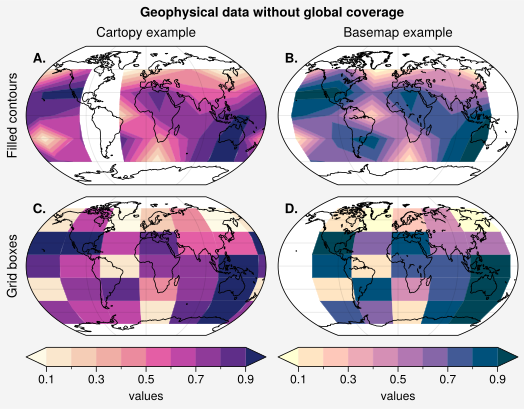
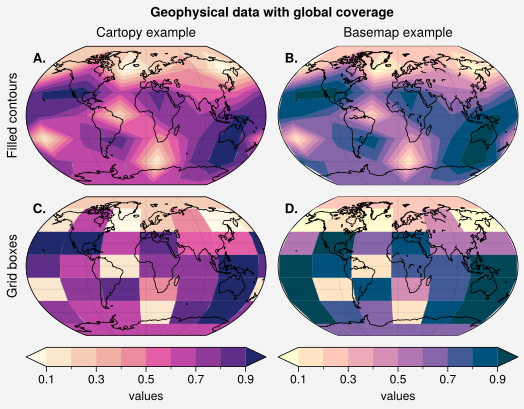
To ensure that a 2D PlotAxes command like
contour() or pcolor()
fills the entire globe, simply pass globe=True to the command.
This interpolates the data to the North and South poles and across the longitude
seam before plotting. This is a convenient and succinct alternative to cartopy’s
add_cyclic_point() and basemap’s addcyclic().
To draw content above or underneath a given geographic feature, simply change
the zorder
property for that feature. For example, to draw land patches on top of all plotted
content as a “land mask” you can use ax.format(land=True, landzorder=4) or set
uplt.rc['land.zorder'] = 4 (see the next section
for details).
[4]:
import ultraplot as uplt
import numpy as np

# Fake data with unusual longitude seam location and without coverage over poles
offset = -40
lon = uplt.arange(offset, 360 + offset - 1, 60)
lat = uplt.arange(-60, 60 + 1, 30)
state = np.random.RandomState(51423)
data = state.rand(len(lat), len(lon))

# Plot data both without and with globe=True
for globe in (False, True):
    string = "with" if globe else "without"
    gs = uplt.GridSpec(nrows=2, ncols=2)
    fig = uplt.figure(refwidth=2.5, share=0)
    for i, ss in enumerate(gs):
        cmap = ("sunset", "sunrise")[i % 2]
        backend = ("cartopy", "basemap")[i % 2]
        ax = fig.subplot(ss, proj="kav7", backend=backend)
        if i > 1:
            ax.pcolor(lon, lat, data, cmap=cmap, globe=globe, extend="both")
        else:
            m = ax.contourf(lon, lat, data, cmap=cmap, globe=globe, extend="both")
            fig.colorbar(m, loc="b", span=i + 1, label="values", extendsize="1.7em")
    fig.format(
        suptitle=f"Geophysical data {string} global coverage",
        toplabels=("Cartopy example", "Basemap example"),
        leftlabels=("Filled contours", "Grid boxes"),
        toplabelweight="normal",
        leftlabelweight="normal",
        coast=True,
        lonlines=90,
        abc="A.",
        abcloc="ul",
        abcborder=False,
    )
/tmp/ipykernel_3987/2315279040.py:19: UltraPlotWarning: backend='basemap' will be deprecated in next major release (v2.0). See https://github.com/Ultraplot/ultraplot/pull/243
  ax = fig.subplot(ss, proj="kav7", backend=backend)
/tmp/ipykernel_3987/2315279040.py:19: UltraPlotWarning: backend='basemap' will be deprecated in next major release (v2.0). See https://github.com/Ultraplot/ultraplot/pull/243
  ax = fig.subplot(ss, proj="kav7", backend=backend)
/tmp/ipykernel_3987/2315279040.py:19: UltraPlotWarning: backend='basemap' will be deprecated in next major release (v2.0). See https://github.com/Ultraplot/ultraplot/pull/243
  ax = fig.subplot(ss, proj="kav7", backend=backend)
/tmp/ipykernel_3987/2315279040.py:19: UltraPlotWarning: backend='basemap' will be deprecated in next major release (v2.0). See https://github.com/Ultraplot/ultraplot/pull/243
  ax = fig.subplot(ss, proj="kav7", backend=backend)
/home/docs/checkouts/readthedocs.org/user_builds/ultraplot/conda/465/lib/python3.13/site-packages/IPython/core/events.py:96: UltraPlotWarning: Tick label sharing not implemented for mixed subplot types.
  func(*args, **kwargs)
/home/docs/checkouts/readthedocs.org/user_builds/ultraplot/conda/465/lib/python3.13/site-packages/IPython/core/events.py:96: UltraPlotWarning: Tick label sharing not implemented for mixed subplot types.
  func(*args, **kwargs)
/home/docs/checkouts/readthedocs.org/user_builds/ultraplot/conda/465/lib/python3.13/site-packages/IPython/core/pylabtools.py:170: UltraPlotWarning: Tick label sharing not implemented for mixed subplot types.
  fig.canvas.print_figure(bytes_io, **kw)
/home/docs/checkouts/readthedocs.org/user_builds/ultraplot/conda/465/lib/python3.13/site-packages/IPython/core/pylabtools.py:170: UltraPlotWarning: Tick label sharing not implemented for mixed subplot types.
  fig.canvas.print_figure(bytes_io, **kw)
Formatting projections
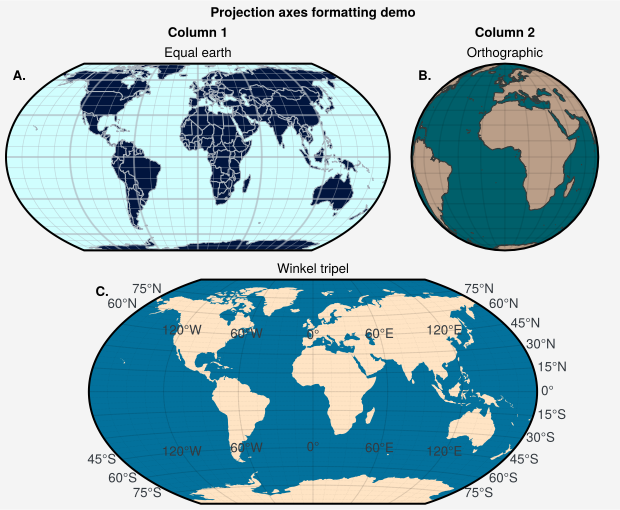
The format() command facilitates geographic-specific axes
modifications. It can toggle and configure the “major” and “minor” longitude and
latitude gridline locations using the grid, lonlocator, latlocator, gridminor,
lonminorlocator, and latminorlocator keys, and configure gridline label formatting
with lonformatter and latformatter (analogous to xlocator, xminorlocator,
and xformatter used by ultraplot.axes.CartesianAxes.format()). By default, inline
cartopy labels and cartopy label rotation are turned off, but inline labels can
be turned on using loninline=True, latinline=True, or inlinelabels=True
or by setting rc['grid.inlinelabels'] to True, and label rotation can be
turned on using rotatelabels=True or by setting rc['grid.rotatelabels']
to True. The padding between the map edge and the labels can be changed
using labelpad or by changing rc['grid.labelpad'].
format() can also set the cartopy projection bounding longitudes
and latitudes with lonlim and latlim (analogous to xlim and ylim), set the
latitude bound for circular polar projections using boundinglat, and toggle and
configure geographic features like land masses, coastlines, and administrative
borders using settings like land, landcolor, coast,
coastcolor, and coastlinewidth. Finally, since ultraplot.axes.GeoAxes.format()
calls ultraplot.axes.Axes.format(), it can be used to add axes titles, a-b-c labels,
and figure titles, just like ultraplot.axes.CartesianAxes.format(). UltraPlot also adds the ability to add tick marks for longitude and latitude using the keywords lontick and lattick for rectilinear projections only. This can enhance contrast and readability under some conditions, e.g. when overlaying contours.
For details, see the ultraplot.axes.GeoAxes.format() documentation.
[5]:
import ultraplot as uplt

gs = uplt.GridSpec(ncols=3, nrows=2, wratios=(1, 1, 1.2), hratios=(1, 1.2))
fig = uplt.figure(refwidth=4, share=0)

# Styling projections in different ways
ax = fig.subplot(gs[0, :2], proj="eqearth")
ax.format(
    title="Equal earth",
    land=True,
    landcolor="navy",
    facecolor="pale blue",
    coastcolor="gray5",
    borderscolor="gray5",
    innerborderscolor="gray5",
    gridlinewidth=1.5,
    gridcolor="gray5",
    gridalpha=0.5,
    gridminor=True,
    gridminorlinewidth=0.5,
    coast=True,
    borders=True,
    borderslinewidth=0.8,
)
ax = fig.subplot(gs[0, 2], proj="ortho")
ax.format(
    title="Orthographic",
    reso="med",
    land=True,
    coast=True,
    latlines=10,
    lonlines=15,
    landcolor="mushroom",
    suptitle="Projection axes formatting demo",
    facecolor="petrol",
    coastcolor="charcoal",
    coastlinewidth=0.8,
    gridlinewidth=1,
)
ax = fig.subplot(gs[1, :], proj="wintri")
ax.format(
    land=True,
    facecolor="ocean blue",
    landcolor="bisque",
    title="Winkel tripel",
    lonlines=60,
    latlines=15,
    gridlinewidth=0.8,
    gridminor=True,
    gridminorlinestyle=":",
    lonlabels=True,
    latlabels="r",
    loninline=True,
    gridlabelcolor="gray8",
    gridlabelsize="med-large",
)
fig.format(
    suptitle="Projection axes formatting demo",
    toplabels=("Column 1", "Column 2"),
    abc="A.",
    abcloc="ul",
    abcborder=False,
    linewidth=1.5,
)
/home/docs/checkouts/readthedocs.org/user_builds/ultraplot/conda/465/lib/python3.13/site-packages/cartopy/io/__init__.py:242: DownloadWarning: Downloading: https://naturalearth.s3.amazonaws.com/50m_physical/ne_50m_land.zip
  warnings.warn(f'Downloading: {url}', DownloadWarning)
/home/docs/checkouts/readthedocs.org/user_builds/ultraplot/conda/465/lib/python3.13/site-packages/cartopy/io/__init__.py:242: DownloadWarning: Downloading: https://naturalearth.s3.amazonaws.com/50m_physical/ne_50m_coastline.zip
  warnings.warn(f'Downloading: {url}', DownloadWarning)
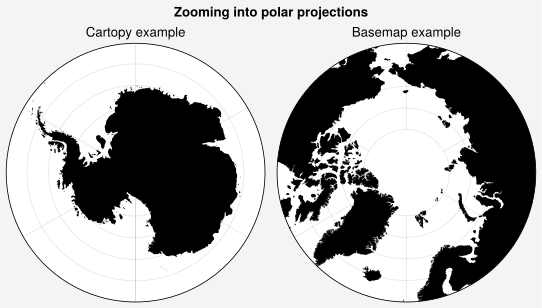
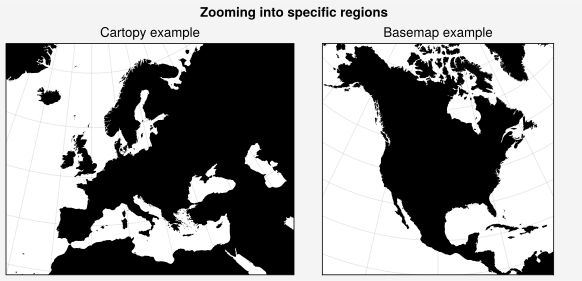
Zooming into projections
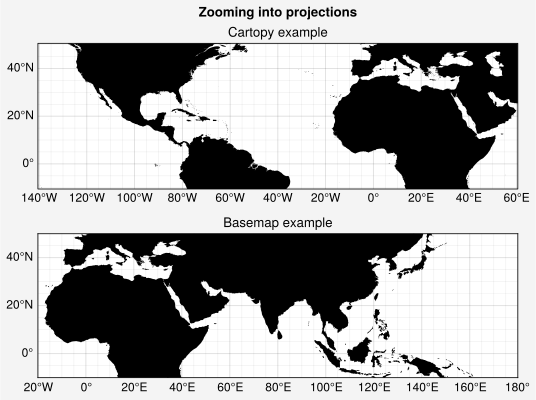
To zoom into cartopy projections, use
set_extent() or pass lonlim,
latlim, or boundinglat to format(). The boundinglat
keyword controls the circular latitude boundary for North Polar and
South Polar Stereographic, Azimuthal Equidistant, Lambert Azimuthal
Equal-Area, and Gnomonic projections. By default, UltraPlot tries to use the
degree-minute-second cartopy locators and formatters made available in cartopy
0.18. You can switch from minute-second subintervals to traditional decimal
subintervals by passing dms=False to format()
or by setting rc['grid.dmslabels'] to False.
To zoom into basemap projections, pass any of the boundinglat,
llcrnrlon, llcrnrlat, urcrnrlon, urcrnrlat, llcrnrx, llcrnry,
urcrnrx, urcrnry, width, or height keyword arguments to
the Proj constructor function either directly or via
the proj_kw subplots() keyword argument. You can also pass
lonlim and latlim to Proj and these arguments
will be used for llcrnrlon, llcrnrlat, etc. You cannot zoom into basemap
projections with format after they have already been created.
[6]:
import ultraplot as uplt

# Plate Carrée map projection
uplt.rc.reso = "med"  # use higher res for zoomed in geographic features
basemap = uplt.Proj("cyl", lonlim=(-20, 180), latlim=(-10, 50), backend="basemap")
fig, axs = uplt.subplots(nrows=2, refwidth=5, proj=("cyl", basemap), share=0)
axs.format(
    land=True,
    labels=True,
    lonlines=20,
    latlines=20,
    gridminor=True,
    suptitle="Zooming into projections",
)
axs[0].format(lonlim=(-140, 60), latlim=(-10, 50), labels=True)
axs[0].format(title="Cartopy example")
axs[1].format(title="Basemap example")
/home/docs/checkouts/readthedocs.org/user_builds/ultraplot/conda/465/lib/python3.13/site-packages/IPython/core/events.py:96: UltraPlotWarning: Tick label sharing not implemented for mixed subplot types.
  func(*args, **kwargs)
/home/docs/checkouts/readthedocs.org/user_builds/ultraplot/conda/465/lib/python3.13/site-packages/IPython/core/pylabtools.py:170: UltraPlotWarning: Tick label sharing not implemented for mixed subplot types.
  fig.canvas.print_figure(bytes_io, **kw)
[7]:
import ultraplot as uplt

# Pole-centered map projections
basemap = uplt.Proj("npaeqd", boundinglat=60, backend="basemap")
fig, axs = uplt.subplots(ncols=2, refwidth=2.7, proj=("splaea", basemap), share=0)
fig.format(suptitle="Zooming into polar projections")
axs.format(land=True, latmax=80)  # no gridlines poleward of 80 degrees
axs[0].format(boundinglat=-60, title="Cartopy example")
axs[1].format(title="Basemap example")
/home/docs/checkouts/readthedocs.org/user_builds/ultraplot/conda/465/lib/python3.13/site-packages/IPython/core/events.py:96: UltraPlotWarning: Tick label sharing not implemented for mixed subplot types.
  func(*args, **kwargs)
/home/docs/checkouts/readthedocs.org/user_builds/ultraplot/conda/465/lib/python3.13/site-packages/IPython/core/pylabtools.py:170: UltraPlotWarning: Tick label sharing not implemented for mixed subplot types.
  fig.canvas.print_figure(bytes_io, **kw)
[8]:
import ultraplot as uplt

# Zooming in on continents
fig = uplt.figure(refwidth=3, share=0)
ax = fig.subplot(121, proj="lcc", proj_kw={"lon0": 0})
ax.format(lonlim=(-20, 50), latlim=(30, 70), title="Cartopy example")
proj = uplt.Proj("lcc", lon0=-100, lat0=45, width=8e6, height=8e6, backend="basemap")
ax = fig.subplot(122, proj=proj)
ax.format(lonlines=20, title="Basemap example")
fig.format(suptitle="Zooming into specific regions", land=True)
/home/docs/checkouts/readthedocs.org/user_builds/ultraplot/conda/465/lib/python3.13/site-packages/IPython/core/events.py:96: UltraPlotWarning: Tick label sharing not implemented for mixed subplot types.
  func(*args, **kwargs)
/home/docs/checkouts/readthedocs.org/user_builds/ultraplot/conda/465/lib/python3.13/site-packages/IPython/core/pylabtools.py:170: UltraPlotWarning: Tick label sharing not implemented for mixed subplot types.
  fig.canvas.print_figure(bytes_io, **kw)
[9]:
import ultraplot as uplt

# Zooming in with cartopy degree-minute-second labels
# Set TeX Gyre Heros as the primary font but fall back to DejaVu Sans
uplt.rc["font.family"] = ["TeX Gyre Heros", "DejaVu Sans"]
uplt.rc.reso = "hi"
fig = uplt.figure(refwidth=2.5)
ax = fig.subplot(121, proj="cyl")
ax.format(lonlim=(-7.5, 2), latlim=(49.5, 59))
ax = fig.subplot(122, proj="cyl")
ax.format(lonlim=(-6, -2), latlim=(54.5, 58.5))
fig.format(
    land=True,
    labels=True,
    borders=True,
    borderscolor="white",
    suptitle="Cartopy degree-minute-second labels",
)
uplt.rc.reset()
/home/docs/checkouts/readthedocs.org/user_builds/ultraplot/conda/465/lib/python3.13/site-packages/cartopy/io/__init__.py:242: DownloadWarning: Downloading: https://naturalearth.s3.amazonaws.com/10m_physical/ne_10m_land.zip
  warnings.warn(f'Downloading: {url}', DownloadWarning)
/home/docs/checkouts/readthedocs.org/user_builds/ultraplot/conda/465/lib/python3.13/site-packages/cartopy/io/__init__.py:242: DownloadWarning: Downloading: https://naturalearth.s3.amazonaws.com/10m_cultural/ne_10m_admin_0_boundary_lines_land.zip
  warnings.warn(f'Downloading: {url}', DownloadWarning)

Included projections
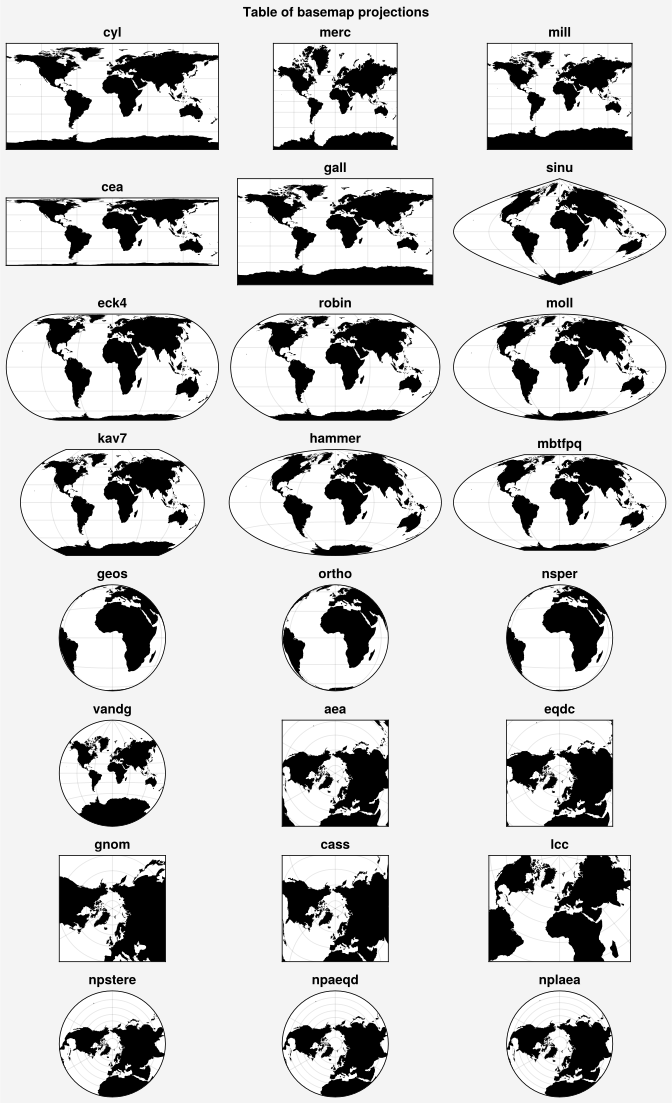
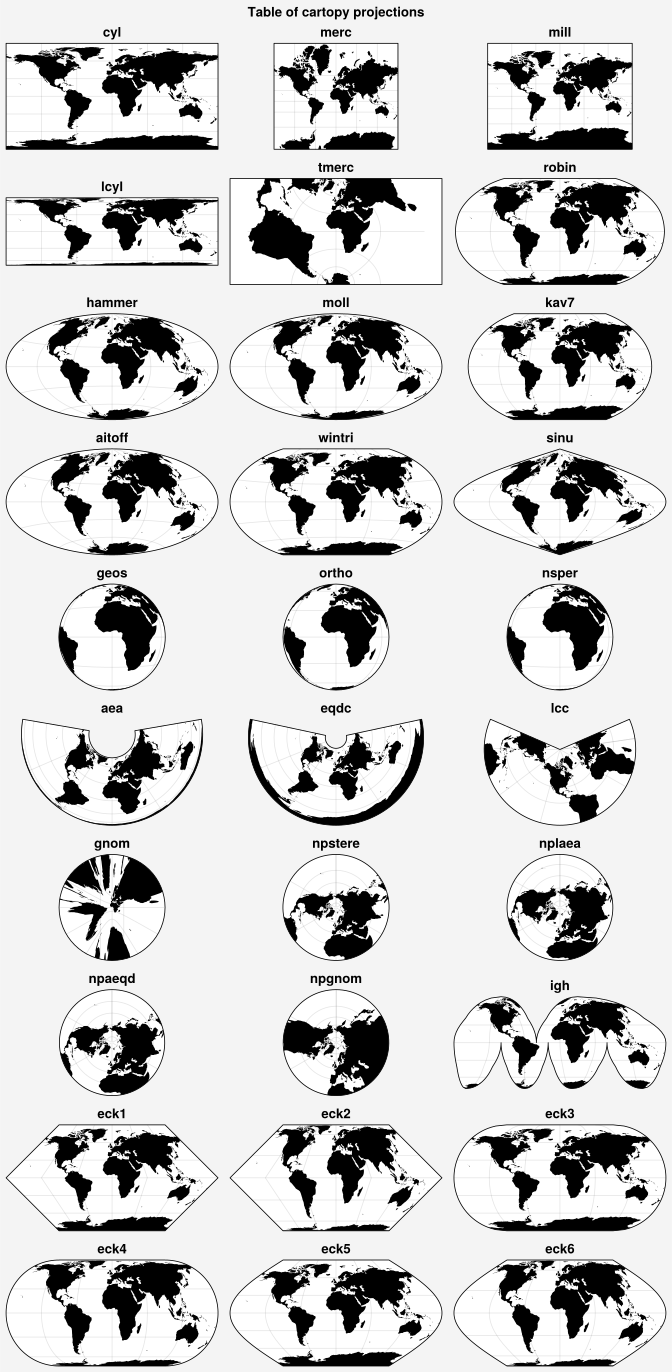
The available cartopy and basemap projections are plotted below. The full table of projection names with links to the relevant PROJ documentation is found here.
UltraPlot uses the cartopy API to add the Aitoff, Hammer, Winkel Tripel, and
Kavrayskiy VII projections (i.e., 'aitoff', 'hammer', 'wintri',
and 'kav7'), as well as North and South polar versions of the Azimuthal
Equidistant, Lambert Azimuthal Equal-Area, and Gnomonic projections (i.e.,
'npaeqd', 'spaeqd', 'nplaea', 'splaea', 'npgnom', and
'spgnom'), modeled after cartopy’s existing NorthPolarStereo
and SouthPolarStereo projections.
[10]:
import ultraplot as uplt

# Table of cartopy projections
projs = [
    "cyl",
    "merc",
    "mill",
    "lcyl",
    "tmerc",
    "robin",
    "hammer",
    "moll",
    "kav7",
    "aitoff",
    "wintri",
    "sinu",
    "geos",
    "ortho",
    "nsper",
    "aea",
    "eqdc",
    "lcc",
    "gnom",
    "npstere",
    "nplaea",
    "npaeqd",
    "npgnom",
    "igh",
    "eck1",
    "eck2",
    "eck3",
    "eck4",
    "eck5",
    "eck6",
]
fig, axs = uplt.subplots(ncols=3, nrows=10, figwidth=7, proj=projs, share=0)
axs.format(land=True, reso="lo", labels=False, suptitle="Table of cartopy projections")
for proj, ax in zip(projs, axs):
    ax.format(title=proj, titleweight="bold", labels=False)
[11]:
import ultraplot as uplt

# Table of basemap projections
projs = [
    "cyl",
    "merc",
    "mill",
    "cea",
    "gall",
    "sinu",
    "eck4",
    "robin",
    "moll",
    "kav7",
    "hammer",
    "mbtfpq",
    "geos",
    "ortho",
    "nsper",
    "vandg",
    "aea",
    "eqdc",
    "gnom",
    "cass",
    "lcc",
    "npstere",
    "npaeqd",
    "nplaea",
]
fig, axs = uplt.subplots(
    ncols=3, nrows=8, figwidth=7, proj=projs, backend="basemap", share=0
)
axs.format(land=True, labels=False, suptitle="Table of basemap projections")
for proj, ax in zip(projs, axs):
    ax.format(title=proj, titleweight="bold", labels=False)
/tmp/ipykernel_3987/1987493379.py:30: UltraPlotWarning: backend='basemap' will be deprecated in next major release (v2.0). See https://github.com/Ultraplot/ultraplot/pull/243
  fig, axs = uplt.subplots(
/tmp/ipykernel_3987/1987493379.py:30: UltraPlotWarning: backend='basemap' will be deprecated in next major release (v2.0). See https://github.com/Ultraplot/ultraplot/pull/243
  fig, axs = uplt.subplots(
/tmp/ipykernel_3987/1987493379.py:30: UltraPlotWarning: backend='basemap' will be deprecated in next major release (v2.0). See https://github.com/Ultraplot/ultraplot/pull/243
  fig, axs = uplt.subplots(
/tmp/ipykernel_3987/1987493379.py:30: UltraPlotWarning: backend='basemap' will be deprecated in next major release (v2.0). See https://github.com/Ultraplot/ultraplot/pull/243
  fig, axs = uplt.subplots(
/tmp/ipykernel_3987/1987493379.py:30: UltraPlotWarning: backend='basemap' will be deprecated in next major release (v2.0). See https://github.com/Ultraplot/ultraplot/pull/243
  fig, axs = uplt.subplots(
/tmp/ipykernel_3987/1987493379.py:30: UltraPlotWarning: backend='basemap' will be deprecated in next major release (v2.0). See https://github.com/Ultraplot/ultraplot/pull/243
  fig, axs = uplt.subplots(
/tmp/ipykernel_3987/1987493379.py:30: UltraPlotWarning: backend='basemap' will be deprecated in next major release (v2.0). See https://github.com/Ultraplot/ultraplot/pull/243
  fig, axs = uplt.subplots(
/tmp/ipykernel_3987/1987493379.py:30: UltraPlotWarning: backend='basemap' will be deprecated in next major release (v2.0). See https://github.com/Ultraplot/ultraplot/pull/243
  fig, axs = uplt.subplots(
/tmp/ipykernel_3987/1987493379.py:30: UltraPlotWarning: backend='basemap' will be deprecated in next major release (v2.0). See https://github.com/Ultraplot/ultraplot/pull/243
  fig, axs = uplt.subplots(
/tmp/ipykernel_3987/1987493379.py:30: UltraPlotWarning: backend='basemap' will be deprecated in next major release (v2.0). See https://github.com/Ultraplot/ultraplot/pull/243
  fig, axs = uplt.subplots(
/tmp/ipykernel_3987/1987493379.py:30: UltraPlotWarning: backend='basemap' will be deprecated in next major release (v2.0). See https://github.com/Ultraplot/ultraplot/pull/243
  fig, axs = uplt.subplots(
/tmp/ipykernel_3987/1987493379.py:30: UltraPlotWarning: backend='basemap' will be deprecated in next major release (v2.0). See https://github.com/Ultraplot/ultraplot/pull/243
  fig, axs = uplt.subplots(
/tmp/ipykernel_3987/1987493379.py:30: UltraPlotWarning: backend='basemap' will be deprecated in next major release (v2.0). See https://github.com/Ultraplot/ultraplot/pull/243
  fig, axs = uplt.subplots(
/tmp/ipykernel_3987/1987493379.py:30: UltraPlotWarning: backend='basemap' will be deprecated in next major release (v2.0). See https://github.com/Ultraplot/ultraplot/pull/243
  fig, axs = uplt.subplots(
/tmp/ipykernel_3987/1987493379.py:30: UltraPlotWarning: backend='basemap' will be deprecated in next major release (v2.0). See https://github.com/Ultraplot/ultraplot/pull/243
  fig, axs = uplt.subplots(
/tmp/ipykernel_3987/1987493379.py:30: UltraPlotWarning: backend='basemap' will be deprecated in next major release (v2.0). See https://github.com/Ultraplot/ultraplot/pull/243
  fig, axs = uplt.subplots(
/tmp/ipykernel_3987/1987493379.py:30: UltraPlotWarning: backend='basemap' will be deprecated in next major release (v2.0). See https://github.com/Ultraplot/ultraplot/pull/243
  fig, axs = uplt.subplots(
/tmp/ipykernel_3987/1987493379.py:30: UltraPlotWarning: backend='basemap' will be deprecated in next major release (v2.0). See https://github.com/Ultraplot/ultraplot/pull/243
  fig, axs = uplt.subplots(
/tmp/ipykernel_3987/1987493379.py:30: UltraPlotWarning: backend='basemap' will be deprecated in next major release (v2.0). See https://github.com/Ultraplot/ultraplot/pull/243
  fig, axs = uplt.subplots(
/tmp/ipykernel_3987/1987493379.py:30: UltraPlotWarning: backend='basemap' will be deprecated in next major release (v2.0). See https://github.com/Ultraplot/ultraplot/pull/243
  fig, axs = uplt.subplots(
/tmp/ipykernel_3987/1987493379.py:30: UltraPlotWarning: backend='basemap' will be deprecated in next major release (v2.0). See https://github.com/Ultraplot/ultraplot/pull/243
  fig, axs = uplt.subplots(
/tmp/ipykernel_3987/1987493379.py:30: UltraPlotWarning: backend='basemap' will be deprecated in next major release (v2.0). See https://github.com/Ultraplot/ultraplot/pull/243
  fig, axs = uplt.subplots(
/tmp/ipykernel_3987/1987493379.py:30: UltraPlotWarning: backend='basemap' will be deprecated in next major release (v2.0). See https://github.com/Ultraplot/ultraplot/pull/243
  fig, axs = uplt.subplots(
/tmp/ipykernel_3987/1987493379.py:30: UltraPlotWarning: backend='basemap' will be deprecated in next major release (v2.0). See https://github.com/Ultraplot/ultraplot/pull/243
  fig, axs = uplt.subplots(