Color cycles
UltraPlot defines color cycles or discrete colormaps as color palettes
comprising sets of distinct colors. Unlike continuous colormaps,
interpolation between these colors may not make sense. Generally, color cycles are
used with distinct plot elements like lines and bars. Occasionally,
they are used with categorical data as “qualitative” colormaps. UltraPlot’s
color cycles are registered as DiscreteColormaps,
and can be easily converted into property cyclers
for use with distinct plot elements using the Cycle
constructor function. Cycle can also
extract colors from ContinuousColormaps.
UltraPlot adds several features to help you use color cycles effectively in your figures. This section documents the new registered color cycles, explains how to make and modify color cycles, and shows how to apply them to your plots.
Included color cycles
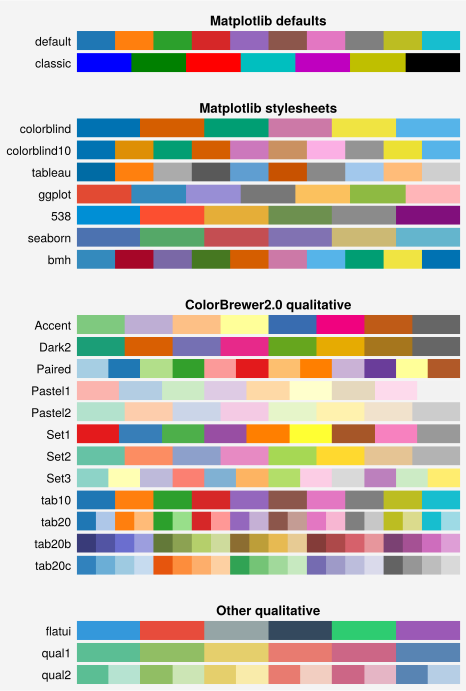
Use show_cycles() to generate a table of registered color
cycles. The table includes the default color cycles registered by UltraPlot and
“user” color cycles created with the Cycle constructor
function or loaded from user_folder(). If you need
the list of colors associated with a registered or on-the-fly color cycle,
simply use get_colors().
[1]:
import ultraplot as uplt

fig, axs = uplt.show_cycles(rasterized=True)
Changing the color cycle
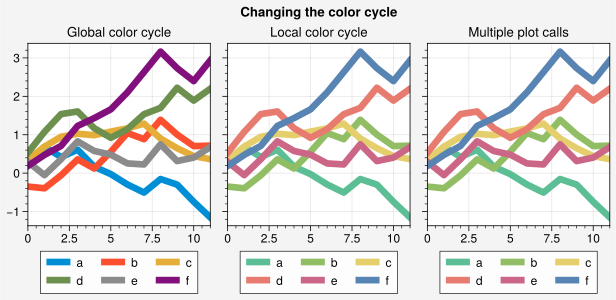
Most 1D PlotAxes commands like line()
and scatter() accept a cycle keyword (see the
1D plotting section). This can be used to change the
color cycle on-the-fly, whether plotting with successive calls to
PlotAxes commands or a single call using 2D array(s) (see
the 1D plotting section). To change the global property
cycler, pass a DiscreteColormap or cycle name
to rc.cycle or pass the result of Cycle
to rc['axes.prop_cycle'] (see the configuration guide).
[2]:
import ultraplot as uplt
import numpy as np

# Sample data
state = np.random.RandomState(51423)
data = (state.rand(12, 6) - 0.45).cumsum(axis=0)
kwargs = {"legend": "b", "labels": list("abcdef")}

# Figure
lw = 5
uplt.rc.cycle = "538"
fig = uplt.figure(refwidth=1.9, suptitle="Changing the color cycle")

# Modify the default color cycle
ax = fig.subplot(131, title="Global color cycle")
ax.plot(data, lw=lw, **kwargs)

# Pass the cycle to a plotting command
ax = fig.subplot(132, title="Local color cycle")
ax.plot(data, cycle="qual1", lw=lw, **kwargs)

# As above but draw each line individually
# Note that passing cycle=name to successive plot calls does
# not reset the cycle position if the cycle is unchanged
ax = fig.subplot(133, title="Multiple plot calls")
labels = kwargs["labels"]
for i in range(data.shape[1]):
    ax.plot(data[:, i], cycle="qual1", legend="b", label=labels[i], lw=lw)
Making color cycles
UltraPlot includes tools for merging color cycles, modifying existing color
cycles, making new color cycles, and saving color cycles for future use.
Most of these features can be accessed via the Cycle
constructor function. This command returns
Cycler instances whose color properties are determined by the
positional arguments (see below for changing other
properties). Note that every PlotAxes command that accepts a
cycle keyword passes it through this function (see the 1D plotting
section).
Positional arguments passed to Cycle are interpreted
by the Colormap constructor function. If the result
is a DiscreteColormap, those colors are used for the resulting
Cycler. If the result is a ContinuousColormap, the
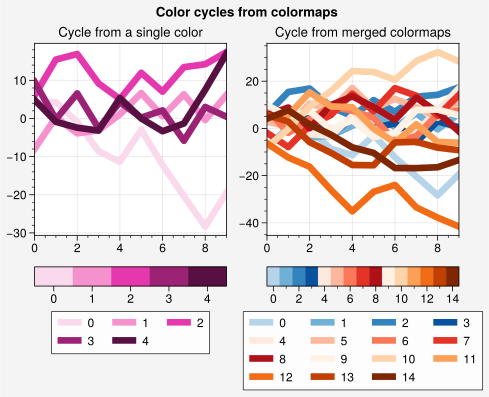
colormap is sampled at N discrete values – for example, uplt.Cycle('Blues', 5)
selects 5 evenly-spaced values. When building color cycles on-the-fly, for example
with ax.plot(data, cycle='Blues'), UltraPlot automatically selects as many colors
as there are columns in the 2D array (i.e., if we are drawing 10 lines using an array
with 10 columns, UltraPlot will select 10 evenly-spaced values from the colormap).
To exclude near-white colors on the end of a colormap, pass e.g. left=x
to Cycle, or supply a plotting command with e.g.
cycle_kw={'left': x}. See the colormaps section for details.
In the below example, several color cycles are constructed from scratch, and the lines are referenced with colorbars and legends. Note that UltraPlot permits generating colorbars from lists of artists.
[3]:
import ultraplot as uplt
import numpy as np

fig = uplt.figure(refwidth=2, share=False)
state = np.random.RandomState(51423)
data = (20 * state.rand(10, 21) - 10).cumsum(axis=0)

# Cycle from on-the-fly monochromatic colormap
ax = fig.subplot(121)
lines = ax.plot(data[:, :5], cycle="plum", lw=5)
fig.colorbar(lines, loc="b", col=1, values=np.arange(0, len(lines)))
fig.legend(lines, loc="b", col=1, labels=np.arange(0, len(lines)))
ax.format(title="Cycle from a single color")

# Cycle from registered colormaps
ax = fig.subplot(122)
cycle = uplt.Cycle("blues", "reds", "oranges", 15, left=0.1)
lines = ax.plot(data[:, :15], cycle=cycle, lw=5)
fig.colorbar(lines, loc="b", col=2, values=np.arange(0, len(lines)), locator=2)
fig.legend(lines, loc="b", col=2, labels=np.arange(0, len(lines)), ncols=4)
ax.format(title="Cycle from merged colormaps", suptitle="Color cycles from colormaps")
Cycles of other properties
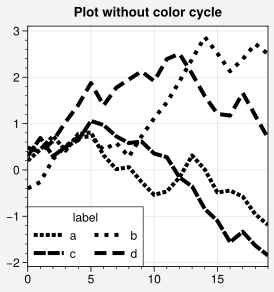
Cycle can generate Cycler instances that
change line() and scatter()
properties other than color. In the below example, a single-color line
property cycler is constructed and applied to the axes locally using the
line properties lw and dashes (the aliases linewidth or linewidths
would also work). The resulting property cycle can be applied globally
using uplt.rc['axes.prop_cycle'] = cycle.
[4]:
import ultraplot as uplt
import numpy as np
import pandas as pd

# Cycle that loops through 'dashes' Line2D property
cycle = uplt.Cycle(lw=3, dashes=[(1, 0.5), (1, 1.5), (3, 0.5), (3, 1.5)])

# Sample data
state = np.random.RandomState(51423)
data = (state.rand(20, 4) - 0.5).cumsum(axis=0)
data = pd.DataFrame(data, columns=pd.Index(["a", "b", "c", "d"], name="label"))

# Plot data
fig, ax = uplt.subplots(refwidth=2.5, suptitle="Plot without color cycle")
obj = ax.plot(
    data, cycle=cycle, legend="ll", legend_kw={"ncols": 2, "handlelength": 2.5}
)
Downloading color cycles
There are several interactive online tools for generating perceptually distinct color cycles, including i want hue, Color Cycle Picker, Colorgorical, Adobe Color, Color Hunt, Coolers, and Color Drop.
To add color cycles downloaded from any of these sources, save the color data file
to the cycles subfolder inside user_folder(),
or to a folder named ultraplot_cycles in the same directory as your python session
or an arbitrary parent directory (see local_folders()).
After adding the file, call register_cycles() or restart your python
session. You can also use from_file() or manually
pass DiscreteColormap instances or file paths to
register_cycles(). See register_cycles()
for a table of recognized data file extensions.